

Project Structure#
A SIERRA project is a directory that SIERRA discovers via
SIERRA_PLUGIN_PATH. This page describes the expected layout of that
directory and the role of each file. For instructions on creating a project from
scratch, see Creating a New SIERRA Project.
Directory Layout#
A complete project looks like this:
myproject/
├── .sierraplugin          # magic cookie — marks this as a project plugin
├── __init__.py
├── cmdline.py             # required: defines --controller and --scenario
├── config/
│   ├── main.yaml          # required: core SIERRA configuration
│   ├── controllers.yaml   # required: controller graph/template config
│   ├── graphs.yaml        # optional: graph generation targets
│   ├── collate.yaml       # optional: data collation targets
│   └── models.yaml        # optional: analytical model configuration
├── generators/
│   ├── scenario.py        # required: parses --scenario, generates template changes
│   └── experiment.py      # optional: per-experiment/per-run customisation
├── variables/             # optional: project-specific batch criteria
│   └── my_variable.py
└── models/                # optional: analytical model implementations
    └── my_model.py
Nothing outside this directory is required. Experiment templates (the
--expdef-template file) live wherever you like and are passed on the command
line; they are not part of the project directory.
File and Directory Reference#
.sierrapluginEmpty marker file that tells SIERRA this directory is a plugin. Required.
__init__.pyStandard Python package marker. Required.
cmdline.pyDefines the
--controllerand--scenarioarguments for this project, and any other project-specific command-line options. Required for all projects. See Extending the SIERRA Cmdline For Your Plugin.config/main.yamlCore SIERRA configuration: the
run_metrics_leafkey (the subdirectory within each run's working directory where output files appear), optional library name for ARGoS, and the path to a performance configuration file. Required. See Project YAML Configuration.config/controllers.yamlDeclares which controllers the project defines, what template changes each one makes, and which graph categories apply to each. Required when running stages 3–5. See config/controllers.yaml.
config/graphs.yamlDeclares what graphs to generate in stage 4 (
intra-expandinter-expsections) and what to imagize (imagizesection). Optional, but without it stage 4 produces nothing. See Graph Generation.config/collate.yamlDeclares which output files and columns to collate across runs within each experiment. Used by Intra-Experiment Data Collation. Optional.
config/models.yamlDeclares which analytical models to run in stage 3 and what their targets are. Used by Model Runner. Optional.
generators/scenario.pyParses the
--scenariostring and produces the template modifications needed to configure each experimental run's context. Required. See Generator Configuration.generators/experiment.pyExtends per-experiment and per-run configuration beyond what the scenario generator provides. Optional. See Generator Configuration.
variables/Project-specific batch criteria and other variable definitions. Files here are importable as
<project>.variables.<name>and can be passed directly to--batch-criteria. Optional. See Create A New Batch Criteria.models/Analytical model implementations. Must contain a
.sierrapluginmarker and an__init__.pyexporting asierra_models()function. Optional. See Model Runner.
Experiment Templates#
The --expdef-template file is not inside the project directory. It is a
standalone configuration file (XML, JSON, YAML, or a ROS launch file) that
SIERRA modifies in stage 1 to produce per-experiment inputs. Keep it wherever
is convenient for your workflow — typically alongside other experiment assets in
a separate exp/ directory:
myrepo/
├── exp/
│   └── template.xml       # passed as --expdef-template
└── projects/
    └── myproject/         # on SIERRA_PLUGIN_PATH
See Experiment Templates for what the template must contain and how SIERRA modifies it.
Where Outputs Go#
SIERRA writes nothing into the project directory. All outputs — generated experiment inputs, raw run outputs, statistics, graphs — go under --sierra-root, organized by project, controller, scenario, and batch criteria. See Runtime Directory Tree for the full output directory structure.
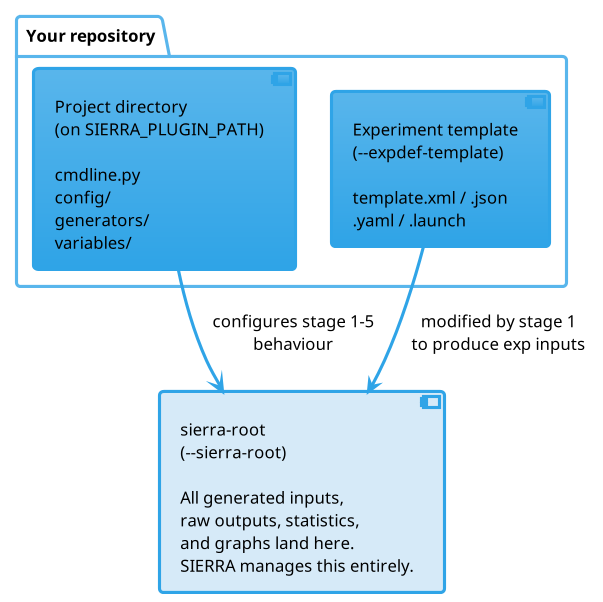
The three separate filesystem locations SIERRA works with. The project directory and template are user-managed inputs; sierra-root is entirely SIERRA-managed output.#