

Intra-Experiment Data Collation#
When generating products, it is often necessary to perform some sort of non-statistical mathematical analysis on the results. These calculations cannot be done on the intra-experiment Processed Output Data files, because any calculated statistical distributions from them will be invalid; this can be thought of as an average of sums is not the same as a sum of averages. To support such use cases, SIERRA can make the necessary parts of the per-run Raw Output Data files available in stage 3 for doing such calculations via Data Collation. Of course, like all things in SIERRA, if you don't need this functionality, you can turn it off by deselecting the plugin.
This process in stage 3 can be visualized as follows for a single Experiment, using Experimental Run as SCOPE:
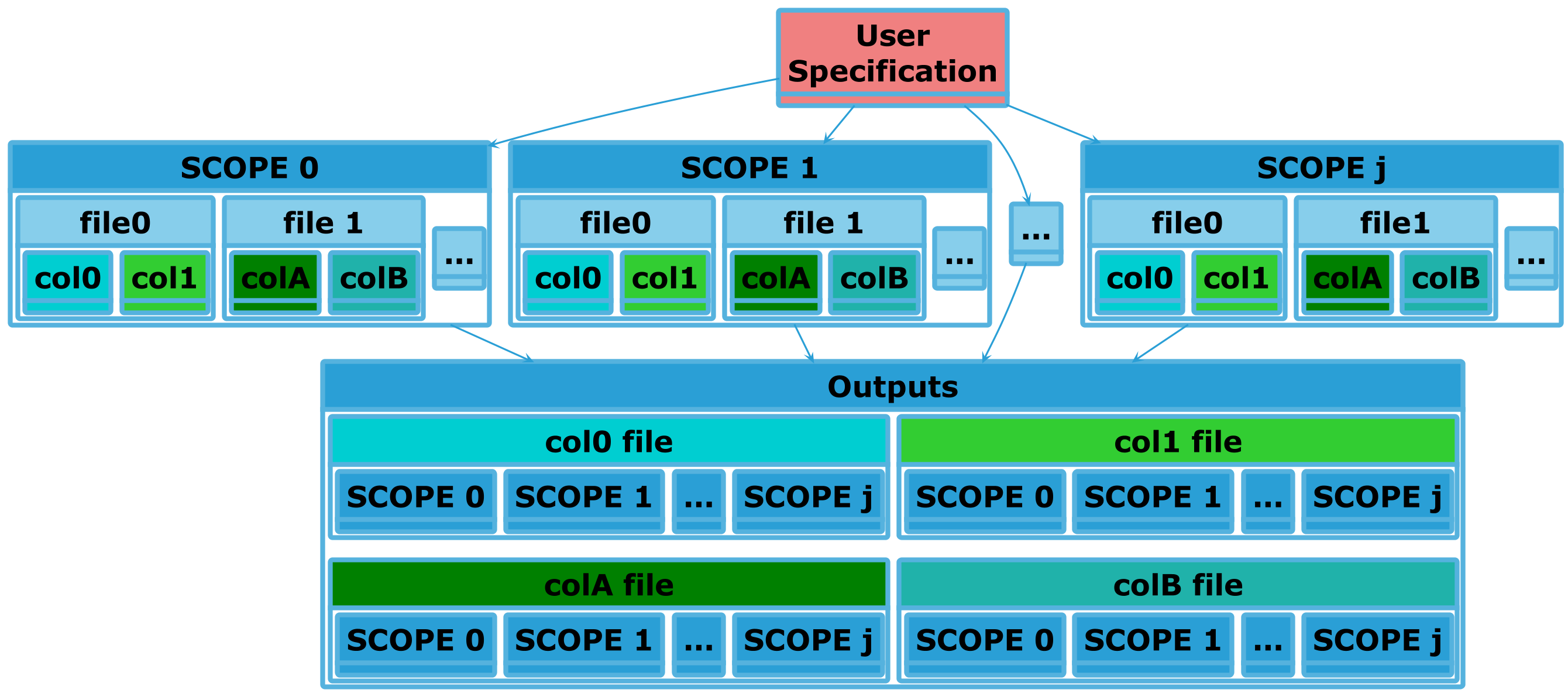
Here, the user has specified that the col{0,1} in file0 produced by all
experimental runs should be combined into a single file. Thus the
Collated Output Data file generated from that specification will have
\(j\) columns, one per run. Similarly for col{A,B} in file1. This is
collation within in an experiment (intra-experiment). Collation across
experiments (if enabled/configured) is done during stage 4, and is handled by a
different plugin.
This plugin requires that the selected storage plugin
supports pd.DataFrame objects.
Ordering Considerations#
Should come after proc.statistics to generate statistics around collated
data.
Usage#
This plugin can be selected by adding proc.collate to the list passed to
--proc. Configuration for this plugin consists of what data to collate,
and some tweaks for how that data should be collated. When active, it will
create <batchroot>/statistics and the following directory structure:
|-- <batchroot>
    |-- statistics
        |-- inter-exp
inter-exp/ contains Collated Output Data files, drawn from specific
columns in Raw Output Data files. This plugin outputs its data as
described above is so it can be used with Graph Generation, which
expects its outputs to be under statistics/.
This plugin does not require additional plugins to be active when it is run.
Cmdline Interface#
sierra - CLI interface#
sierra [--skip-collate]
sierra Multi-stage options#
Options which are used in multiple pipeline stages
Specify that no collation of data across experiments within a batch (stage 4) or across runs within an experiment (stage 3) should be performed. Useful if collation takes a long time and multiple types of stage 4 outputs are desired. Collation is generally idempotent unless you change the stage3 options (YMMV).
Configuration#
Controls what to collate. Collated data is usually "interesting" in some way;
e.g., related to system performance. Configuration lives in a collate.yaml
file; all fields are required unless otherwise specified.
# Contains a list of config items for intra-experiment collation (i.e.,
# collation at the level of experimental runs).
intra-exp:

  # Each config item has 'file' and 'cols' fields. 'file' specifies a
  # filepath, relative to the output directory for each experimental run,
  # containing the data columns of interest. 'cols' specifies the columns of
  # interest.
  - file: foo/bar
    cols:
      - col1
      - col2