

Graph Generation#
This plugin generates graphs using holoviews during stage 4; any graph type supported by a holoviews backend can be selected with --graphs-backend. Since this plugin uses holoviews to do all the heavy lifting, you may wonder "Why wrap holoviews backends at all?" A wrapper of a wrapper would seem gratuitous at first glance. The reason is that SIERRA's wrapping here enables declarative generation graphs supported by any of the holoviews backends. If you used holoviews directly, you would have to change your python code to use a different backend, as well as to account for subtleties when switching between backends which are not yet ironed out in holoviews. SIERRA's declarative approach here enables you focus on your goal (what type of graph to generate, what you want on it, etc.), rather than the details of how that is implemented.
Important
In order to support out-of-the-box declarative syntax, this plugin requires that all the necessary data to generate a given graph is present in the same file.
OS Packages#
apt-get install \
        cm-super \
        texlive-fonts-recommended \
        texlive-latex-extra \
        dvipng
brew install --cask mactex-no-gui
Usage#
This plugin can be selected by adding prod.graphs to the list passed to
--prod. This plugin supports two logical types of graphs, and therefore two
types of analyses:
Intra-experiment graphs, which can be thought of as graphs generated directly from the aggregated data from a set of Experimental Runs.
Inter-experiment graphs, which are generated from a selected subset of data from each Experiment in a Batch Experiment.
Within each of these logical graph types, any --graphs-backend can be specified to generate the actual graphs; overrideable on a per-graph basis. This makes generating mixed e.g. static graphs for inclusion in presentations and interactive graphs for inclusion in webpages easy.
Graph Type |
Use Case Characteristics |
Data Requirements |
|---|---|---|
Linegraph |
|
The data is contained in one or more columns in a single file. Each column contains numerical data forming a time series. |
Heatmap |
|
The data is contained in 3 columns a single file: an X coord column, a Y coord column, and a Z (value) column. |
Confusion Matrix |
The data you want to graph is a set of predicted vs actual category labels. |
The data is contains {truth, predicted} columns. |
Network |
The data you want to graph is a network (graph) of some kind. |
The data is contained in a single GraphML file. |
This plugin can be selected by adding prod.graphs to the list passed to
--prod. When active will create <batchroot>/graphs, and all
graphs generated during stage 4 will accrue under this root directory. Each
experiment will get their own directory in this root for their
statistics. E.g.:
|-- <batchroot>
    |-- graphs
        |-- c1-exp0
        |-- c1-exp1
        |-- c1-exp2
        |-- c1-exp3
        |-- collated
inter-exp/ contains graphs which are generated across experiments in the
batch from Batch Summary Data files.
This plugin requires one of the following stage 3 plugins to have been run:
Statistics Generation (linegraphs). Without this, no statistics can be included.
Cmdline Interface#
sierra - CLI interface#
sierra [--plot-log-xscale] [--plot-enumerated-xscale] [--plot-log-yscale]
       [--plot-primary-axis PLOT_PRIMARY_AXIS] [--plot-large-text] [--plot-transpose-graphs]
       [--graphs-backend {matplotlib,bokeh}]
       [--exp-n-datapoints-factor EXP_N_DATAPOINTS_FACTOR]
       [--exp-graphs {intra,inter,all,none}] [--project-no-LN] [--project-no-HM]
       [--project-no-CM]
sierra Multi-stage options#
Options which are used in multiple pipeline stages
Place the set of X values used to generate intra- and inter-experiment graphs into the logarithmic space. Mainly useful when the batch criteria involves large system sizes, so that the plots are more readable.
Instead of using the values generated by a given batch criteria for the X values, use an enumerated list[0, ..., len(X value) - 1]. Mainly useful when the batch criteria involves large system sizes, so that the plots are more readable.
Place the set of Y values used to generate intra - and inter-experiment graphs into the logarithmic space. Mainly useful when the batch criteria involves large system sizes, so that the plots are more readable.
--plot-primary-axisPLOT_PRIMARY_AXIS-This option allows you to override the primary axis, which is normally is computed based on the batch criteria.
For example, in a bivariate batch criteria composed of
Population Size on the X axis (rows)
Another batch criteria which does not affect system size (columns)
Metrics will be calculated by computing across .csv rows and projecting down the columns by default. Passing a value of 1 to this option will override this calculation, which can be useful in bivariate batch criteria in which you are interested in the effect of the OTHER non-size criteria on various performance measures.
0=criteria of interest varies across rows.
1=criteria of interest varies across columns.
This option only affects generating graphs from bivariate batch criteria.
(default:None)This option specifies that the title, X/Y axis labels/tick labels should be larger than the SIERRA default. This is useful when generating graphs suitable for two column paper format where the default text size for rendered graphs will be too small to see easily. The SIERRA defaults are generally fine for the one column/journal paper format.
Transpose the X, Y axes in generated graphs. Useful as a general way to tweak graphs for best use of space within a paper.
Changed in version 1.2.20: Renamed from
--transpose-graphsto make its relation to other plotting options clearer.
sierra Stage 4 options#
Options for generating products
--graphs-backendGRAPHS_BACKEND-Specify the default backend to be used when generating plots. Can be overriden on a per-graph basis.
matplotlib- Use matplotlib to generate static PNG images.bokeh- Use bokeh to generate stand-alone HTML files containing interactive bokeh visualizations. Files are suitable for inclusion in static webpages, viewing in a browser, etc.
See Graph Generation for more information.
(default:matplotlib)--exp-n-datapoints-factorEXP_N_DATAPOINTS_FACTOR-Specify an additional multiplicative factor for computing the # of datapoints captured duration an Experiment. This is useful if project code has hard-coded down-sampling on experiment length (e.g., it only outputs data every 10 ticks).
(default:1.0)--exp-graphsEXP_GRAPHS-Specify which types of graphs should be generated from experimental results:
(default:intra- Generate intra-experiment graphs from the results of a single experiment within a batch, for each experiment in the batch(this can take a long time with large batch experiments). If any intra-experiment models are defined and enabled, those are run and the results placed on appropriate graphs.inter- Generate inter-experiment graphs _across_ the results of all experiments in a batch. These are very fast to generate, regardless of batch experiment size. If any inter-experiment models are defined and enabled, those are run and the results placed on appropriate graphs.all- Generate all types of graphs.none- Skip graph generation.
all)Specify that the intra-experiment and inter-experiment linegraphs defined in project YAML configuration should not be generated. Useful if you are working on something which results in the generation of other types of graphs, and the generation of those linegraphs is not currently needed only slows down your development cycle.
Model linegraphs are still generated, if applicable.
Specify that the intra-experiment heatmaps defined in project YAML configuration should not be generated. Useful if you are working on something which results in the generation of other types of graphs, and the generation of heatmaps only slows down your development cycle.
Model heatmaps are still generated, if applicable.
Added in version 1.2.20.
Specify that the intra-experiment confusion matrices defined in project YAML configuration should not be generated. Useful if you are working on something which results in the generation of other types of graphs, and the generation of confusion matrices only slows down your development cycle.
Added in version 1.5.6.
Configuration#
This plugin is mostly configured via a graphs.yaml in the Project
config root. The file is structured as follows:
intra-exp:
   mycategory1:
     - ...
     - ...
     - ...
 inter-exp:
   mycategory2:
     - ...
     - ...
     - ...
Important
Because SIERRA tells uv -> matplotlib to use LaTeX internally to generate graph labels, titles, etc., the standard LaTeX character restrictions within strings apply to all fields (e.g., '#' is illegal but '#' is OK).
Intra-experiment graphs and inter-experiment graphs are configured in their corresponding sections as shown. Within each intra-/inter- experiment graph section is a set of categories, and within each category is list of graphs to generate, specified in a declarative way. Categories can be named anything, and serve two purposes:
A nice way to logically cluster your graphs into related semantic groups.
Act as a filtering mechanism in conjunction with the
controllers.yamlfile to tell SIERRA what graphs to generate for what controllers; it is often the case that you don't want to generate all graphs for all controllers, or that some graphs will crash because of missing data if you try to generate them with a specific controller.
Intra-Experiment Graphs#
Configuration for each type of intra-experiment graph currently supported by this plugin is below. Unless stated otherwise, all keys are required.
The "stacked" here comes from multiple lines potentially being present (e.g., plotting all columns in a dataframe).
mycategory:
  # The filepath of the source data file relative to the output directory for an
  # experimental run to look for the column(s) to plot, sans the extension.
  - src_stem: 'somesubdir/foo'

    # The filepath of the graph to be generated (extension/image type is
    # determined elsewhere). This allows for multiple graphs to be generated
    # from the same data file by plotting different combinations of columns.
    dest_stem: 'bar'

    # List of names of columns within the source file that should be included on
    # the plot. Must match EXACTLY (i.e. no fuzzy matching). Defaults to all
    # columns within the data file if omitted for intra-experiment linegraphs;
    # required for inter-experiment linegraphs.
    cols:
      - 'col1'
      - 'col2'
      - 'col3'
      - '...'

    # The title the graph should have. LaTeX syntax is supported (uses
    # matplotlib after all). Optional. Defaults to '' if omitted.
    title: 'My Title'

    # The type of graph. Must be  'stacked_line'.
    type: 'stacked_line'

    # List of names of the plotted lines within the graph. Matched pairwise with
    # the selected columns. Defaults to name of each plotted column if omitted.
    legend:
      - 'Column 1'
      - 'Column 2'
      - 'Column 3'
      - '...'

    # The label of the X-axis of the graph. Optional. Defaults to '' if omitted.
    xlabel: 'X'

    # The label of the Y-axis of the graph. Optional. Defaults to '' if omitted.
    ylabel: 'Y'

    # Should the data points be plotted? Defaults to false if omitted.
    points: false

    # Should the y axis scale by logarithmic? Defaults to --plot-log-yscale if
    # omitted (i.e., this option can be overriden on a per-graph basis if
    # desired).
    logy: false

    # Specify the backend to use to generate the graph. Defaults to
    # --graphs-backend if omitted.
    backend: "matplotlib"
mygraph:
  # The filepath of the source data file relative to the output directory for an
  # experimental run to look for the column(s) to plot, sans the extension.
  - src_stem: 'somesubdir/foo'

    # The filepath of the graph to be generated (extension/image type is
    # determined elsewhere). This allows for multiple graphs to be generated
    # from the same data file by plotting different combinations of columns.
    dest_stem: 'bar'

    # The title the graph should have. LaTeX syntax is supported (uses
    # matplotlib after all). Optional. Defaults to '' if omitted.
    title: 'My Title'

    # The type of graph. Must be 'heatmap'.
    type: 'heatmap'

    # The Z colorbar label to use. Optional. Defaults to '' if omitted.
    zlabel: 'My colorbar label'

    # The X axis label to use. Optional. Defaults to '' if omitted.
    xlabel: 'My X-axis label'

    # The Y axis label to use. Optional. Defaults to '' if omitted.
    ylabel: 'My Y-axis label'

    # The index in the time series to use as the source for heatmap
    # data. -1=last index. Defaults to -1 if omitted.
    index: 14

    # The name of the column containing the X axis values. Defaults to x if
    # omitted.
    x: 'x'

    # The name of the column containing the Y axis values. Defaults to y if
    # omitted.
    y: 'y'

    # The name of the column containing the Z axis values. Defaults to z if
    # omitted.
    z: 'z'

    # Specify the backend to use to generate the graph. Defaults to
    # --graphs-backend if omitted.
    backend: "matplotlib"
Note
This graph is only available when imagizing. This may change in a future version of SIERRA.
mygraph:
  # The filepath of the source data file relative to the output directory for an
  # experimental run to look for the GraphML file to plot, sans the extension.
  - src_stem: 'somesubdir/foo'

    # The filepath of the graph to be generated (extension/image type is
    # determined elsewhere). This allows for multiple graphs to be generated
    # from the same data file by plotting different combinations of columns.
    dest_stem: 'bar'

    # The title the graph should have. LaTeX syntax is supported (uses
    # matplotlib after all). Optional. Defaults to '' if omitted.
    title: 'My Title'

    # The type of graph. Must be 'network'.
    type: 'network'

    # The networkx layout to use for the graph. Valid values are:
    #
    # - spring
    # - spectral
    # - planar
    # - spiral
    # - graphviz_neato
    # - graphviz_dot
    # - bfs
    #
    # All map directly to nx layouts with the exception of graphviz_{dot,neato}
    # which both map to the graphviz layout, using the dot, neato programs for
    # actual layout, respectively.
    #
    # Defaults to "spring" if omitted.
    layout: 'spring'

    # The name of the GraphML node attribute to use to color nodes. If omitted,
    # all nodes will be gray.
    node_color_attr: 'color'

    # The name of the GraphML node attribute to use to determine node size. If
    # omitted, all nodes will be sized according to their degree relative to the
    # min/max for the graph.
    node_size_attr: 'size'

    # The name of the GraphML edge attribute to use to color edges. If omitted,
    # all nodes will be black.
    edge_color_attr: 'color'

    # The name of the GraphML edge attribute to use to weight edge thickness. If
    # omitted, all nodes will be the same thickness.
    edge_weight_attr: 'weight'

    # Specify the backend to use to generate the graph. Defaults to
    # --graphs-backend if omitted.
    backend: "matplotlib"
mygraph:
  # The filepath of the source data file relative to the output directory for an
  # experimental run to look for the column(s) to plot, sans the extension.
  - src_stem: 'somesubdir/foo'

    # The filepath of the graph to be generated (extension/image type is
    # determined elsewhere). This allows for multiple graphs to be generated
    # from the same data file by plotting different combinations of columns.
    dest_stem: 'bar'

    # The title the graph should have. LaTeX syntax is supported (uses
    # matplotlib after all). Optional. Defaults to '' if omitted.
    title: 'My Title'

    # The type of graph. Must be 'confusion_matrix'.
    type: 'confusion_matrix'

    # The column containing ground truth labels. Optional. Defaults to 'truth'
    # if omitted.
    truth_col: 'My truth'

    # The column containing predicted labels. Optional. Defaults to 'predicted'
    # if omitted.
    predicted_col: 'My Predictions'

    # Should the X labels be rotated? Helpful if you have long category
    # names. Defaults to False if omitted.
    xlabels_rotate: False

    # Specify the backend to use to generate the graph. Defaults to
    # --graphs-backend if omitted.
    backend: "matplotlib"
Inter-Experiment Graphs#
Configuration for each type of inter-experiment graph currently supported by this plugin is below. Unless stated otherwise, all keys are required.
The "stacked" here comes from multiple lines potentially being present (e.g., plotting the same column from the same file across all experiments in the batch).
"Nice" X-axis labels are not currently implement for inter-experiment stacked line graphs.
mycategory:
  # The filepath of the source data file relative to the output directory for an
  # experimental run to look for the column(s) to plot, sans the extension.
  - src_stem: 'somesubdir/foo'

    # The filepath of the graph to be generated (extension/image type is
    # determined elsewhere). This allows for multiple graphs to be generated
    # from the same data file by plotting different combinations of columns.
    dest_stem: 'bar'

    # List of names of columns within the source file that should be included on
    # the plot. Must match EXACTLY (i.e. no fuzzy matching). Defaults to all
    # columns within the data file if omitted for intra-experiment linegraphs;
    # required for inter-experiment linegraphs.
    cols:
      - 'col1'
      - 'col2'
      - 'col3'
      - '...'

    # The title the graph should have. LaTeX syntax is supported (uses
    # matplotlib after all). Optional. Defaults to '' if omitted.
    title: 'My Title'

    # The type of graph. Must be  'stacked_line'.
    type: 'stacked_line'

    # List of names of the plotted lines within the graph. Matched pairwise with
    # the selected columns. Defaults to name of each plotted column if omitted.
    legend:
      - 'Column 1'
      - 'Column 2'
      - 'Column 3'
      - '...'

    # The label of the X-axis of the graph. Optional. Defaults to '' if omitted.
    xlabel: 'X'

    # The label of the Y-axis of the graph. Optional. Defaults to '' if omitted.
    ylabel: 'Y'

    # Should the data points be plotted? Defaults to false if omitted.
    points: false

    # Should the y axis scale by logarithmic? Defaults to --plot-log-yscale if
    # omitted (i.e., this option can be overriden on a per-graph basis if
    # desired).
    logy: false

    # Specify the backend to use to generate the graph. Defaults to
    # --graphs-backend if omitted.
    backend: "matplotlib"
The "summary" here comes from the selection of a single point from a time series of interest for each experiment in the batch. For example, if you took the last point of some measure of interest, that might summarize steady-state behavior.
mycategory:
  # The filepath of the source data file relative to the output directory for an
  # experimental run to look for the column(s) to plot, sans the extension.
  - src_stem: 'somesubdir/foo'

    # The filepath of the graph to be generated (extension/image type is
    # determined elsewhere). This allows for multiple graphs to be generated
    # from the same data file by plotting different combinations of columns.
    dest_stem: 'bar'

    # List of names of the column within the source file that should be included
    # on the plot. Must match EXACTLY (i.e. no fuzzy matching).
    col: 'col1'

    # The title the graph should have. LaTeX syntax is supported (uses
    # matplotlib after all). Optional. Defaults to '' if omitted.
    title: 'My Title'

    # The type of graph. Must be 'summary_line'.
    type: 'summary_line'

    # List of names of the plotted lines within the graph. Matched pairwise with
    # the selected columns. Defaults to name of each plotted column if omitted.
    legend:
      - 'Column 1'
      - 'Column 2'
      - 'Column 3'
      - '...'

    # The index in the time series to use as the source for linegraph
    # data. -1=last index. Defaults to -1 if omitted.
    index: 14

    # The label of the X-axis of the graph. Optional. Defaults to '' if omitted.
    xlabel: 'X'

    # The label of the Y-axis of the graph. Optional. Defaults to '' if omitted.
    ylabel: 'Y'

    # Should the data points be plotted? Defaults to false if omitted.
    points: false

    # Should the y axis scale by logarithmic? Defaults to --plot-log-yscale if
    # omitted (i.e., this option can be overriden on a per-graph basis if
    # desired).
    logy: false

    # Specify the backend to use to generate the graph. Defaults to
    # --graphs-backend if omitted.
    backend: "matplotlib"
A 2D heatmap of data, drawn from a specified per-experiment time series (e.g., if you took the last point of some measure of interest, that might summarize steady-state behavior).
The xlabel and ylabel fields are drawn from the current bivariate
batch criteria, along with the x/y ticks.
mygraph:
  # The filepath of the source data file relative to the output directory for an
  # experimental run to look for the column(s) to plot, sans the extension.
  - src_stem: 'somesubdir/foo'

    # The filepath of the graph to be generated (extension/image type is
    # determined elsewhere). This allows for multiple graphs to be generated
    # from the same data file by plotting different combinations of columns.
    dest_stem: 'bar'

    # The title the graph should have. LaTeX syntax is supported (uses
    # matplotlib after all). Optional. Defaults to '' if omitted.
    title: 'My Title'

    # The type of graph. Must be 'heatmap'.
    type: 'heatmap'

    # The Z colorbar label to use. Optional. Defaults to '' if omitted.
    zlabel: 'My colorbar label'

    # The X axis label to use. Optional. Defaults to '' if omitted.
    xlabel: 'My X-axis label'

    # The Y axis label to use. Optional. Defaults to '' if omitted.
    ylabel: 'My Y-axis label'

    # The index in the time series to use as the source for heatmap
    # data. -1=last index. Defaults to -1 if omitted.
    index: 14

    # The name of the column containing the X axis values. Defaults to x if
    # omitted.
    x: 'x'

    # The name of the column containing the Y axis values. Defaults to y if
    # omitted.
    y: 'y'

    # The name of the column containing the Z axis values. Defaults to z if
    # omitted.
    z: 'z'

    # Specify the backend to use to generate the graph. Defaults to
    # --graphs-backend if omitted.
    backend: "matplotlib"
Note
If the batch criteria has dimension > 1, inter-experiment linegraphs are disabled/ignored currently. This will hopefully be fixed in a future version of SIERRA. (SIERRA#357).
Linegraph Examples#
For these examples, we will use the following SIERRA cmd and YAML configuration from the ARGoS sample project.
sierra \
  --sierra-root=~/test \
  --controller=foraging.footbot_foraging \
  --engine=engine.argos \
  --project=projects.sample_argos \
  --exp-setup=exp_setup.T1000.K5 \
  --n-runs=4 \
  --physics-n-engines=1 \
  --expdef-template=~/git/sierra-sample-project/exp/argos/template.argos \
  --scenario=LowBlockCount.10x10x2 \
  --with-robot-leds \
  --with-robot-rab \
  --controller=foraging.footbot_foraging \
  --batch-criteria population_size.Linear5.C5 \
  --exp-n-datapoints-factor=0.1 \
  --dist-stats=none
intra-exp:
  - src_stem: collected-data
    dest_stem: robot-counts
    cols:
      - walking
      - resting
    title: 'Robot Counts'
    legend:
      - 'Walking'
      - 'Resting'

    xlabel: 'Time'
    ylabel: '\# Robots'
    type: 'stacked_line'

  - src_stem: collected-data
    dest_stem: food-counts
    cols:
      - collected_food
    title: 'Collected Food Counts'
    legend:
      - ''

    xlabel: 'Time'
    ylabel: '\# Items'
    type: 'stacked_line'

  - src_stem: collected-data
    dest_stem: swarm-energy
    cols:
      - energy
    title: 'Swarm Energy Over Time'
    legend:
      - ''

    xlabel: 'Time'
    type: 'stacked_line'
Intra-Experiment#
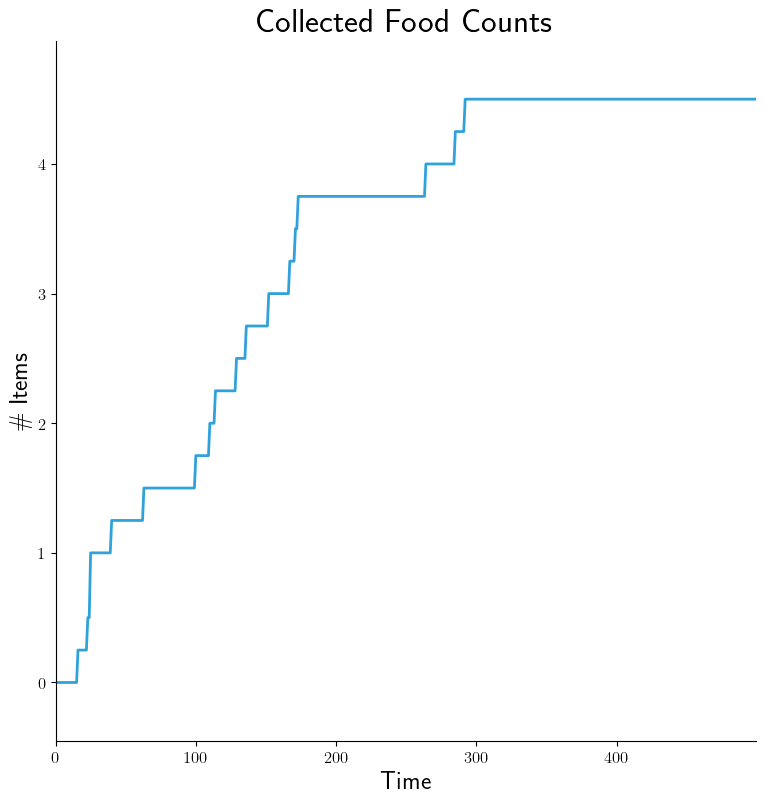
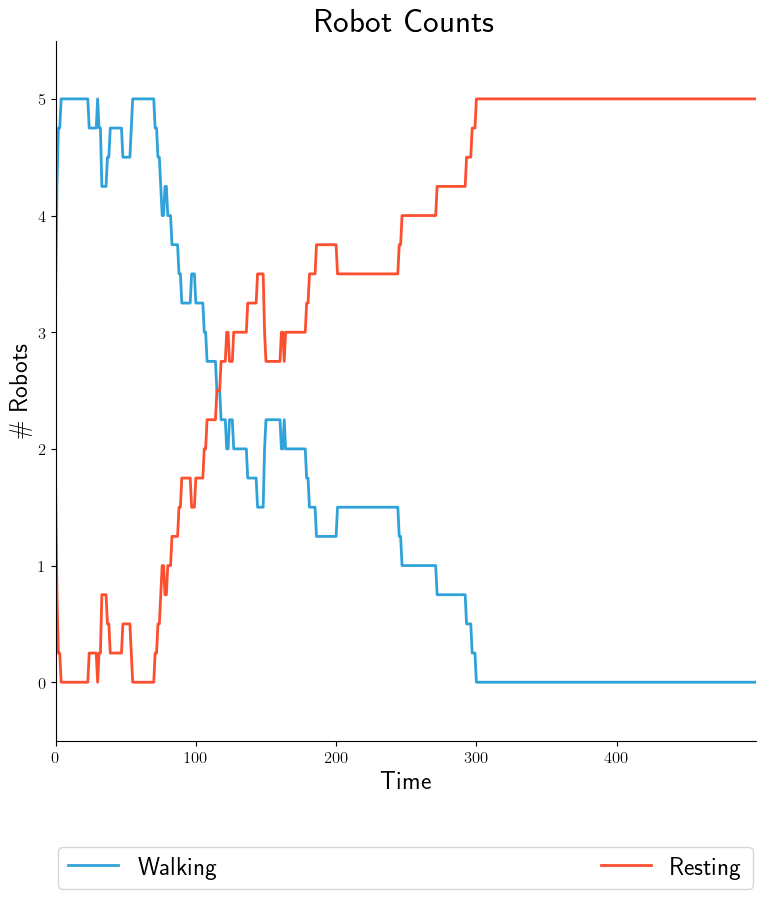
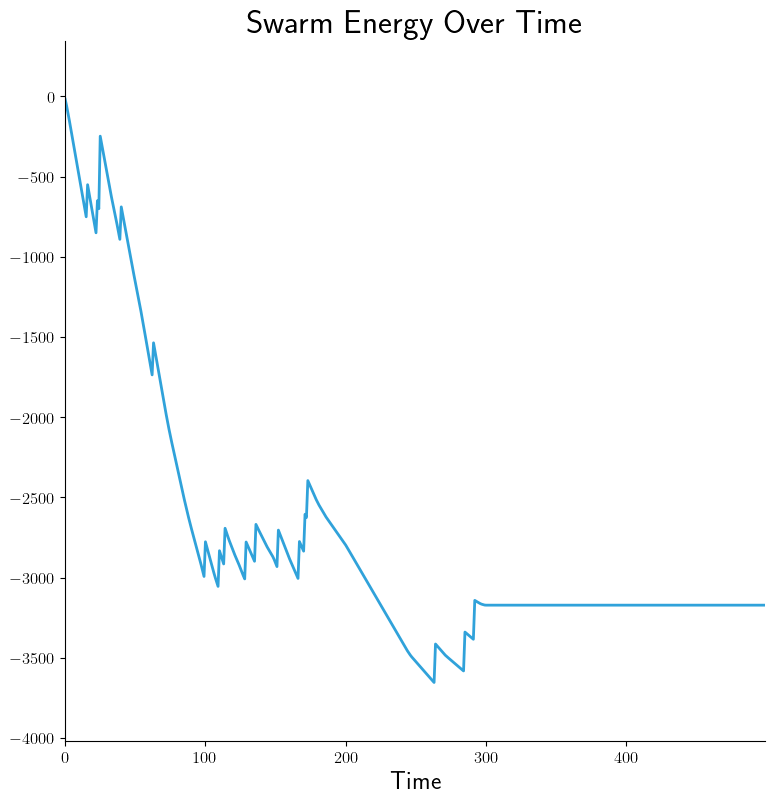
As mentioned earlier, intra-experiment products are time-series based and
generated from processed data within each experiment. Using the above command
and .yaml configuration capabilities we can generate graphs easily with
--graphs-backend=matplotlib, OR interactive widgets with
--graphs-backend=bokeh:
|
|
|
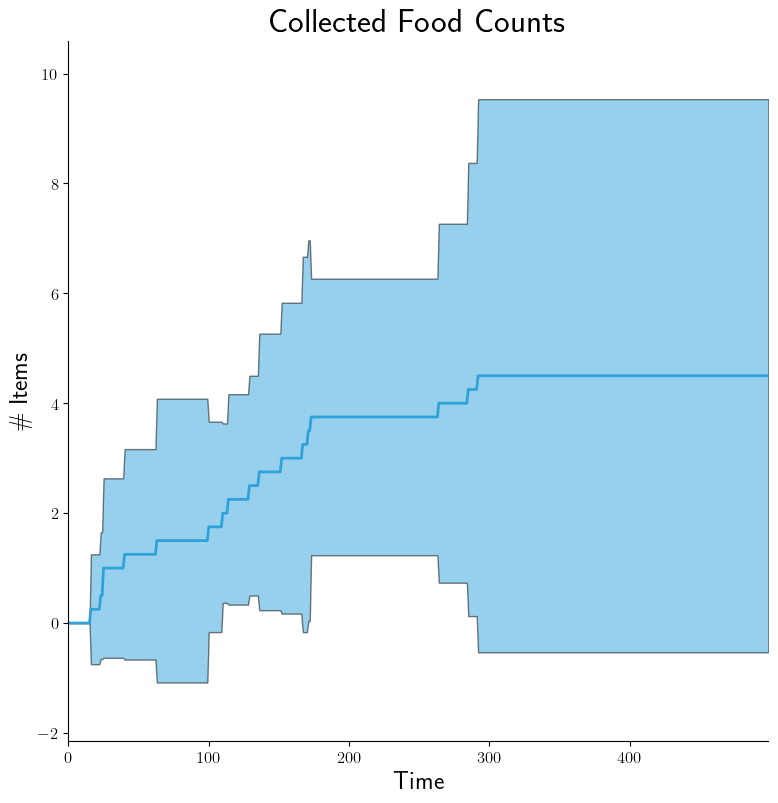
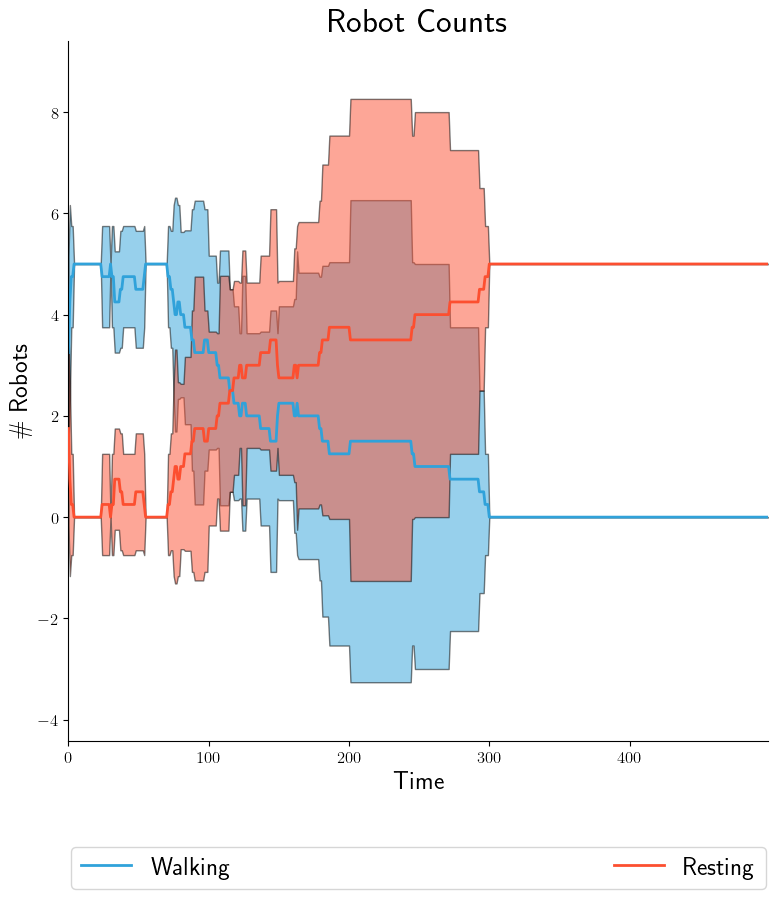
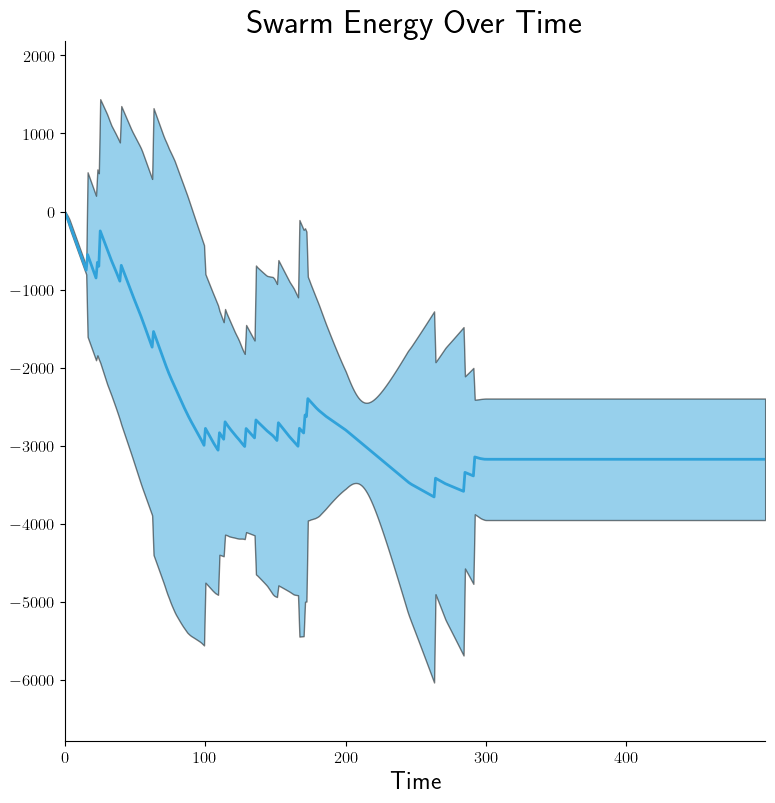
If we then want to plot 95% confidence intervals by doing
--dist-stats=conf95:
|
|
|
Same idea for box-and-whisker plots via --dist-stats=bw (not shown). Now
suppose we want the walking/resting counts to appear on separate graphs. YAML
configuration becomes:
- src_stem: collected-data
  dest_stem: robot-counts
  cols:
    - walking
  title: 'Robot Counts'
  legend:
    - 'Walking'

- src_stem: collected-data
  dest_stem: robot-counts
  cols:
    - resting
  title: 'Robot Counts'
  legend:
    - 'Resting'
It's really that easy!
Inter-Experiment#
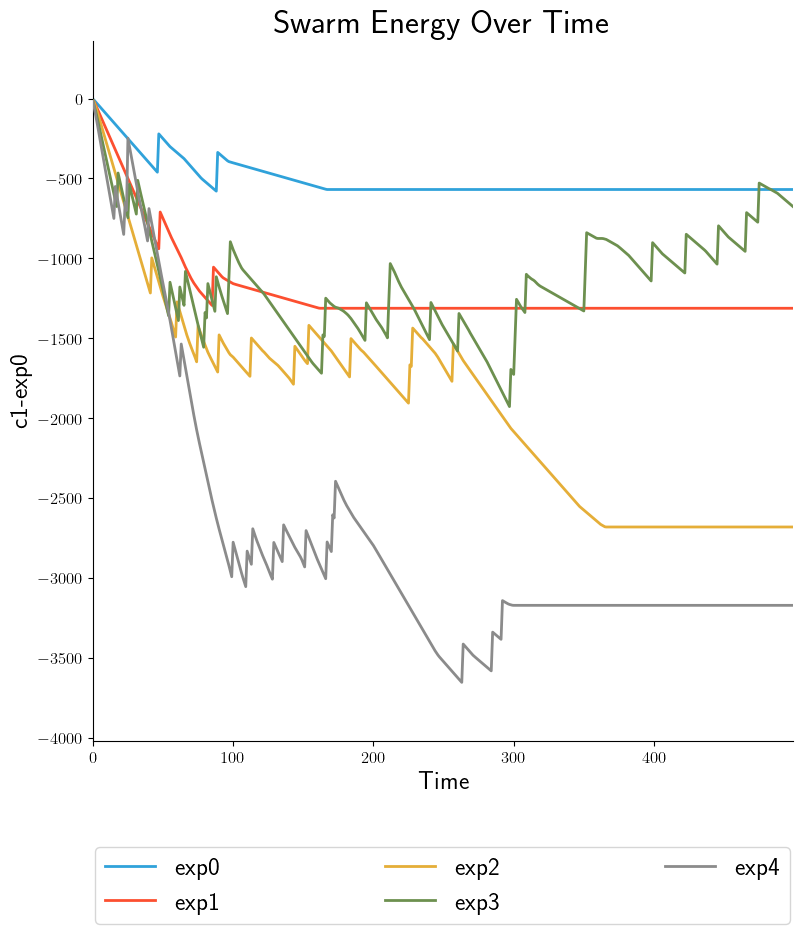
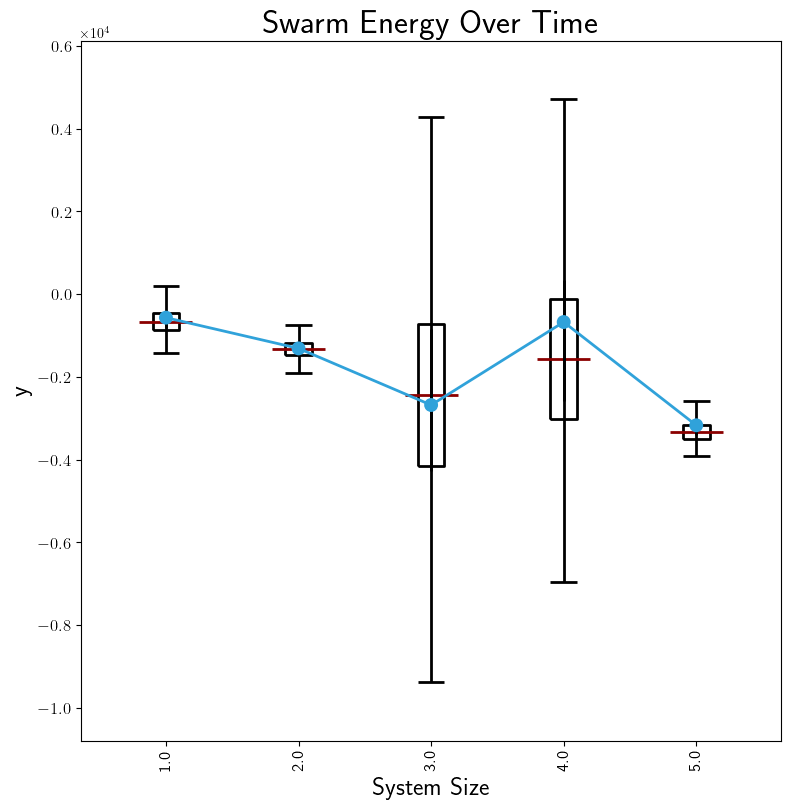
After stage 3, some data is in Processed Output Data files. In stage 4, we can run Data Collation on either of these types of files in order to further refine their contents but at the level of a experiments within a batch rather than experimental runs within an experiment. After collation, inter-experiment products can be generated directly. These products can be time-based, showing results from each experiment. Compare the two graphs, each representing the same data: a measurement of swarm energy over time. The graph on the right is arguably more readable because it summarizes the steady-state information more clearly.
|
|
For the summary graph, the X-axis labels are populated based on the Batch Criteria used. Obviously, this is for a single batch experiment; summary graphs for multiple batch experiments can be combined in stage 5. See Graph Comparison for info.
Confusion Matrix Examples#
For these examples, we will use the following SIERRA cmd and YAML configuration from the YAMLSIM sample project
sierra \
   --sierra-root=~/test \
   --controller=default.default \
   --engine=plugins.yamlsim \
   --project=projects.sample_yamlsim \
   --n-runs=4 \
   --expdef-template=~/git/sierra-sample-project/exp/yamlsim/template.yaml \
   --scenario=scenario1 \
   --expdef=expdef.yaml \
   --yamlsim-path=~/git/sierra-sample-project/plugins/yamlsim/yamlsim.py \
   --proc proc.statistics proc.collate \
   --controller=default.default \
   --batch-criteria noise_floor.1.9.C5 \
   --pipeline 1 2 3 4
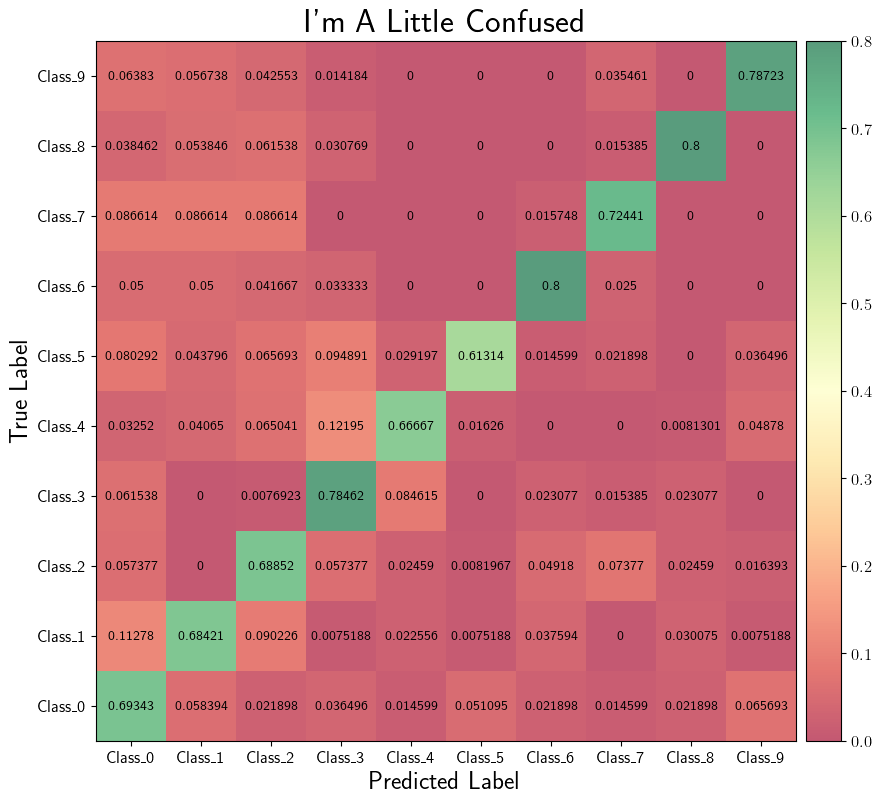
intra-exp:
  CM_default:
    - src_stem: confusion-matrix
      dest_stem: confusion-matrix
      type: "confusion_matrix"
      title: "I'm A Little Confused"
      truth_col: Actual_Class
      predicted_col: Predicted_Class
Intra-Experiment#
In addition to time-series based outputs, projects can also output
classification data in terms of predicted vs actual labels. These can be
combined into confusion matrices within each experiment to give a nice summary
of performance. Using the above command and .yaml configuration capabilities
we can generate graphs easily with --graphs-backend=matplotlib, OR
interactive widgets with --graphs-backend=bokeh:
|