

Model Runner#
Models in SIERRA are (generally) time-series based: they predict things at a
given instant over time. They come in two flavors: intra-experiment, and
inter-experiment. Intra-experiment models run in the context of a single
Experiment, and can "target" any number of
stacked_line() graphs for inclusion. If included,
model results are plotted using dashed lines to distinguish them from empirical
data. Some examples from the sample project:
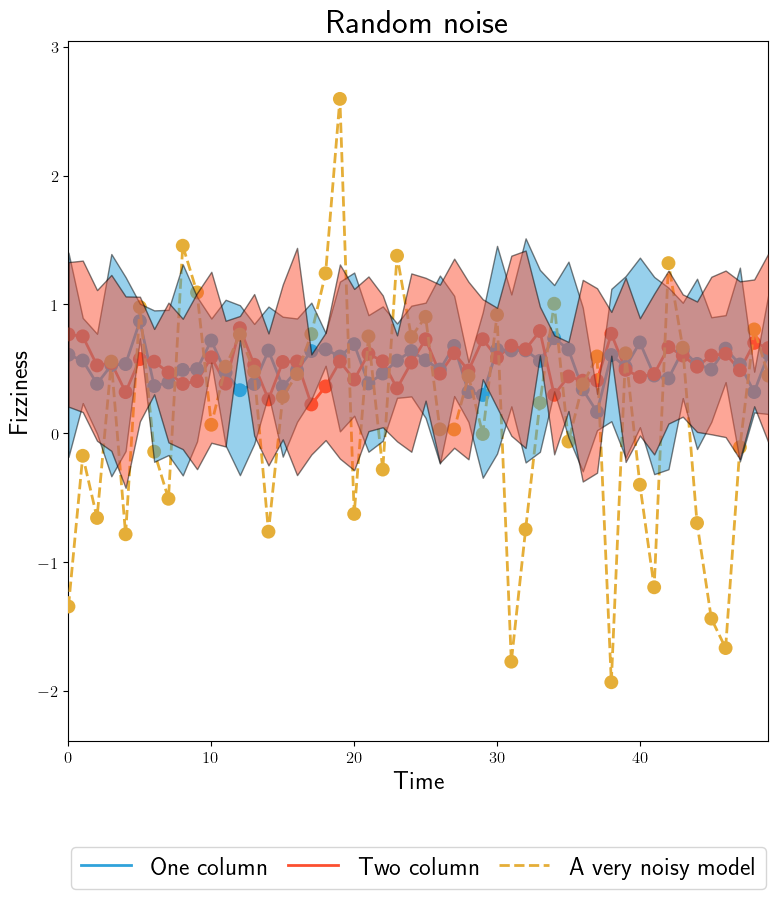
The noisy model is \(Normal(\mu=0,\theta=0.1)\). Data is \(Normal(\mu=0, \theta=0.5)\).#
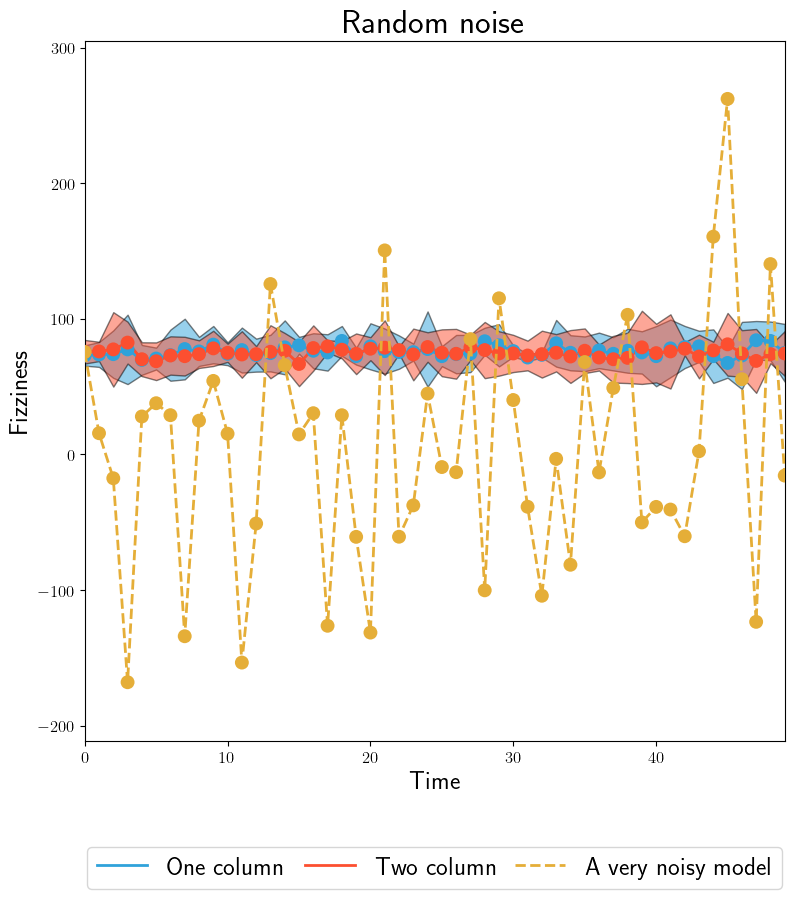
The same model, targeting binomially distributed data by changing YAML config. Binomial data is \(Binomial(n=50,p=0.3)\).#
Inter-experiment models, on the other hand run in the context of the
Batch Experiment, and (generally) are built from the outputs of their
intra-experiment counterparts, and don't actually compute anything. Likewise,
they can "target" any number of summary_line() graphs
for inclusion. If included, model results are plotted using dashed lines to
distinguish them from empirical data. Some examples from the sample
project:
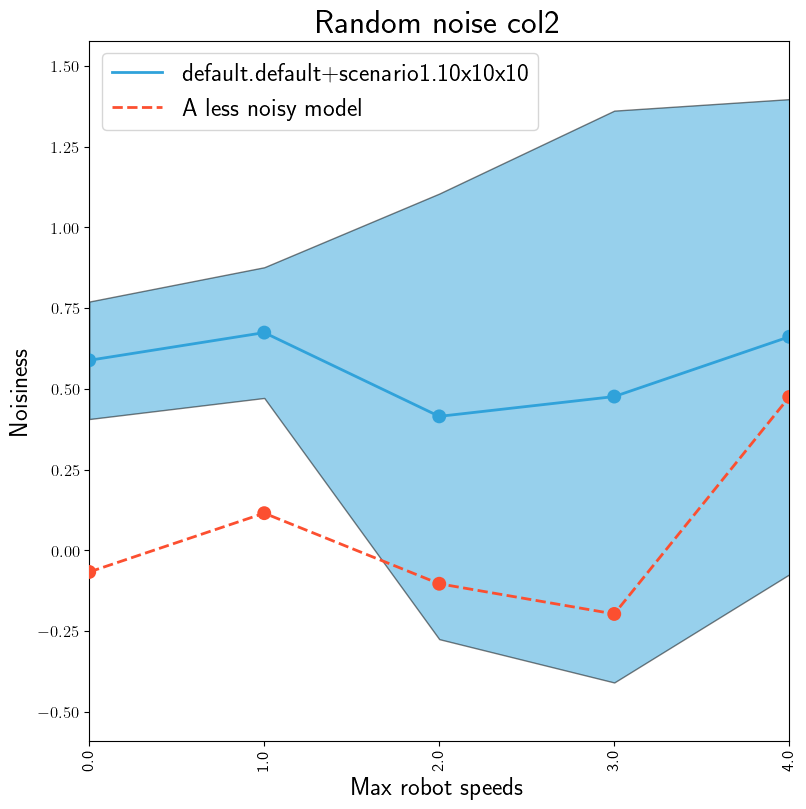
The model is \(Normal(\mu=0,\theta=0.01)\). Data is \(Normal(\mu=0, \theta=0.5)\).#
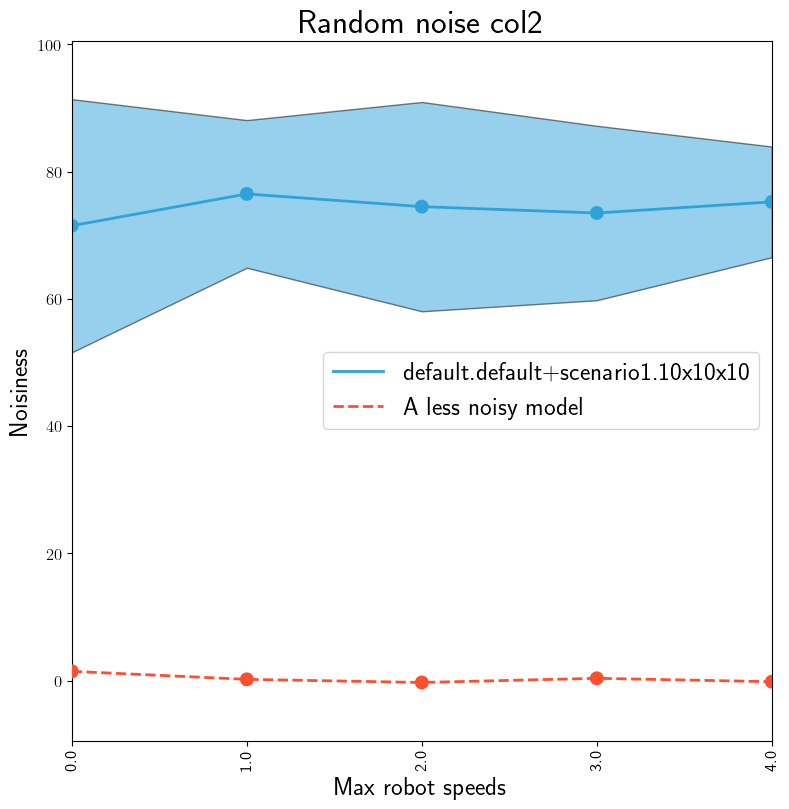
The same model, targeting binomially distributed data by changing YAML config. Binomial data is \(Binomial(n=50,p=0.3)\).#
Models can take any number of input (including 0) Collated Output Data files. See Intra-Experiment Data Collation for why you cannot in general use Processed Output Data files as model inputs. SIERRA does not enforce this, so it is left to researchers to follow best practices in this case.
All models, when enabled/active, execute during stage 3.
Ordering Considerations#
Should come after proc.statistics and/or proc.collate if the models use
that data.
Usage#
This plugin can be selected by adding proc.modelrunner to the list passed to
--proc. When active, this plugin will create
<batchroot>/models, and data generated by all executed models stage 3 will
accrue under this root directory. Each Experiment will get their own
directory in this root for their models. E.g.:
|-- <batchroot>
    |-- models
        |-- c1-exp0
        |-- c1-exp1
        |-- c1-exp2
        |-- c1-exp3
        |-- inter-exp/
Inter-experiment models data will appear in inter-exp/.
This plugin has the following plugin requirements:
Intra-Experiment Data Collation. If your model takes Experimental Run outputs as its inputs, then those outputs must be collated before passing to your model to generate statistically valid measures of fit.
Graph Generation. This plugin currently is only works with the
prod.graphsplugin; that is, the results of running models can only appear on graphs generated using that plugin.
There are multiple "gates" which a model must pass to be run, to allow for maximum flexibility in many different use cases:
A model must to be contained in a
.pyfile which conforms to one of the plugin schemas.The model's enclosing directory has to be on
SIERRA_PLUGIN_PATH.The path of the model, specified relative to the
__init___.pyin it's package directory, must be returned bysierra_models(), as described in the plugin schema. For example, if you have the following:|-- <project root> |-- models |-- __init__.py |-- mymodel.py
And you have a intra-experiment model class
MyAwesomeModelinmymodel.py, thensierra_models()must returnmymodel.MyAwesomeModel.The model is enabled in
<project root>/config/models.yaml, as described below.The
proc.modelrunnerplugin is active when stage 3 is executed.The appropriate
should_run()callback in the relevant model interaface returnsTrue. This final gate is to allow additional selection of model execution based on current Batch Criteria, so projects can define and leave models enabled which are only valid for certain types of experiments.
Cmdline Interface#
None for the moment.
Configuration#
This plugin is mostly configured via a models.yaml within the
Project config root. The file is structured as follows, with all fields
required unless otherwise specified.
intra-exp:
   # The name of the model, specified as a python path relative to the
   # directory container the __init__.py. Must be unique among all active
   # models, or data will be overwritten.
   - name: model1
     # The file stems/names of the graphs which this model should appear
     # on. Must match the 'src_stem' field of the corresponding stacked_line
     # graph to trigger inclusion.
     targets:
       - mygraph1
       - another-graph
     # The names of the plotted model predictions. Optional. Defaults to
     # "Model Prediction" for all generated dataframes if omitted.
     legend:
       - foobar
     # All other fields are interpreted as per-model parameters.
     param1: 4
     param2: 18

 inter-exp:
   # The name of the model, specified as a python path relative to the
   # directory container the __init__.py.
   - name: nested.model2
     # The file stems/names of the graphs which this model should appear on.
     # Must match the 'dest_stem' field of the corresponding summary_line
     # graph to trigger inclusion.
     targets:
       - mygraph1
       - another-graph
     # The name of the plotted model predictions. Optional. Defaults to
     # "Model Prediction" for all generated dataframes if omitted.
     legend:
       - foobar
     # All other fields are interpreted as per-model parameters.
     param1: fizz
     param2:
       - buzz
       - frobnicate
Intra-experiment models and inter-experiment models are configured in their
corresponding sections as shown. The names of the models in models.yaml
must exactly match names in the sierra_models() list (see below). Each
model specified in models.yaml can take any number of parameters of any type
specified as extra fields in the YAML file as shown above; they will be parsed
and passed to the model constructor as part of config. For example, for
nested.model2, a dictionary containing {"param1": "fizz", "param2":
["buzz", "frobnicate"]} would be passed.
The category mechanism from controllers.yaml is not used here, because in
addition to wanting to filter enabling/running models by controller, you also
often want to filter based on the scenario/batch criteria, so filtering is
performed via a callback function in the model interface rather than
declaratively here.
See also YAML configuration Intra-Experiment Data Collation.
Creating A New Model#
Models can be written in any language, but if they aren't python, you will have
to write some python bindings to translate the inputs/outputs into things that
SIERRA can understand/is expecting. Model code can be anywhere, as long as the
enclosing directory is on SIERRA_PLUGIN_PATH. For a directory on
SIERRA_PLUGIN_PATH to be recognized as a model plugin, the directory
needs to conform to one of the plugin schemas.
By defining models via sierra_models() which takes a string argument for the
type of model [ intra, inter ] and returns a list of the names of the
intra- and inter-experiment models present in the file, this allows the user
flexibility to group multiple related models together in the same file, rather
than requiring 1 model per .py file.
Look at:
to determine if one of the model types SIERRA already supports will work for you. If one will, great! Otherwise, you'll have to open a PR with a new model for the one you create.
Define your models and/or their bindings in one or more
.pyfiles in a directory onSIERRA_PLUGIN_PATH. SIERRA allows model plugins to be anywhere and try to match the names in themodels.yamlagainst loaded plugins. That opens up the possibility of name collisions, but tweaking the plugin path can fix this in the unlikely event that it happens.Add any necessary model input configuration according to Intra-Experiment Data Collation.
Enable your model by adding it to
<project>/config/models.yaml, as shown in the example above.Run your model during stage 3 by adding
proc.modelrunnerto--proc. You will need to make sure theproc.collateis also active.