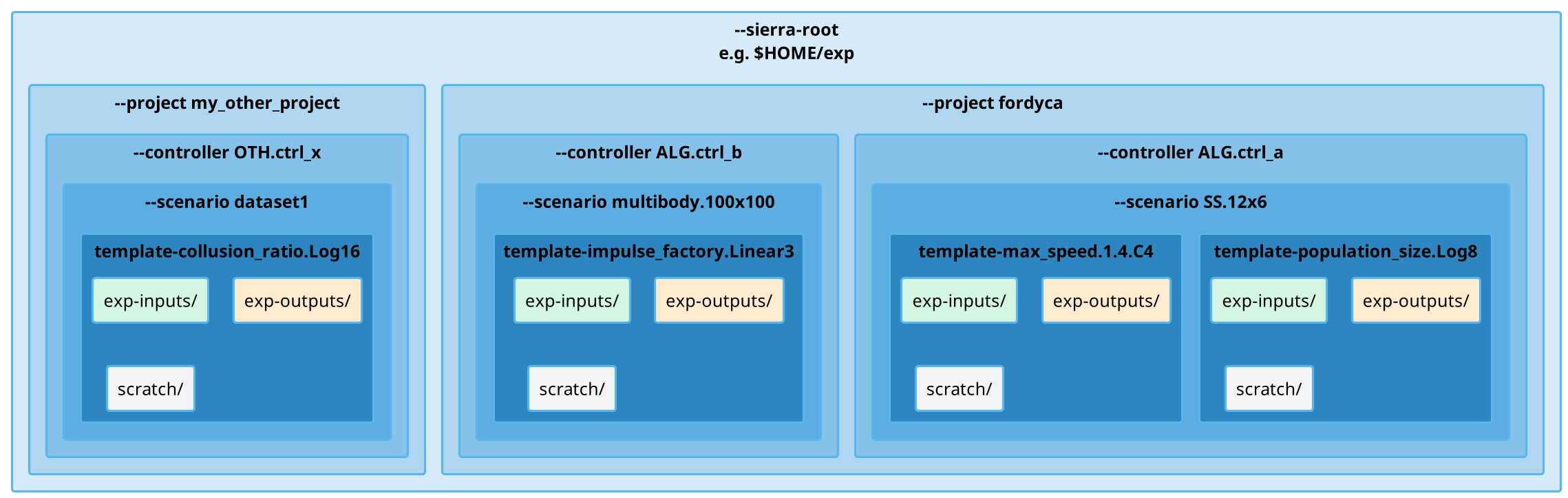
Runtime Directory Tree#
Important
SIERRA NEVER deletes directories for you.
So, if a directory that SIERRA needs to create already exists during stage {1,2}, it will abort processing in order to preserve data integrity; this is not necessary to do for stages {3,4,5}, because those stages can be recreated using the results of stages {1,2}. This behavior can be overwridden with --exp-overwrite, in which case the user assumes full responsibility for ensuring the integrity of the experiment.
Always better to check the arguments before hitting ENTER. Measure twice, cut once, as the saying goes.
Basic Structure#
The SIERRA run-time directory tree is intentionally designed to support multiple Projects, multiple Batch Criteria, multiple controllers/scenarios (see Experimental Design for more info), with multiple template input files, without having to worry about collisions. Thus, when starting out with SIERRA, the directory structure may seem needlessly complex. See also Design Philosophy.
Directory |
Meaning |
Configurable? |
|---|---|---|
SIERRA root |
The root directory that SIERRA outputs EVERYTHING to. SIERRA will read configuration/inputs from where you tell it to, but all outputs generated during at any pipeline stage will appear under here. |
|
Batchroot |
ALL files (generated experiment inputs, experiment outputs, deliverables, etc.) are written to this directory, which will be under --sierra-root. Named using a combination of:
Subsequent experiments using the same values for these cmdline arguments WILL result in the same calculated root directory for experimental inputs and outputs, even if other parameters change (or if you change the contents of the template input file). This WILL result in SIERRA aborting processing during stages {1,2} if this occurs, as described above. |
No. |
Batch input root |
All experiment input files will be generated under this root directory. |
No/named |
Batch output root |
All experiment output files in stage 2 will accrue under this root directory. Each experiment will get their own subdirectory in this root for its outputs to accrue into. |
No/named |
Batch scratch root. |
All |
No/named |
Core Pipeline Directory Tree (Stages 1-2)#
When SIERRA runs stages 1-2, it creates a directory structure under whatever was passed as --sierra-root. The specifics of what directories/files get created may depend on the specific set of active plugins; see the plugin docs for details. However, the SIERRA core creates a consistent set of directories during stages 1-2. for the purposes of explanation, I will use the following partial SIERRA option set to explain the core experiment tree:
--sierra-root=$HOME/exp\
--controller=CATEGORY.my_controller\
--scenario=SS.12x6\
--engine=engine.argos\
--batch-criteria=population_size.Log8\
--n-runs=4\
--expdef-template=~/my-template.argos\
--project=fordyca
This invocation will cause SIERRA to create the following directory structure as it runs:
$HOME/exp
|-- fordyca
    |-- CATEGORY.my_controller
        |-- SS.12x6
           |-- mytemplate-population_size.Log8
               |-- exp-inputs
                  |-- c1-exp0
                      commands.txt
                      my-template_run0.argos
                      my-template_run1.argos
                      my-template_run2.argos
                      my-template_run3.argos
                  |-- c1-exp1
                      commands.txt
                      my-template_run0.argos
                      my-template_run1.argos
                      my-template_run2.argos
                      my-template_run3.argos
                  |-- c1-exp2
                      ...
                  |-- c1-exp3
                      ...
               |-- exp-outputs
                  |-- c1-exp0
                      my-template_run0_output/
                      my-template_run1_output/
                      my-template_run2_output/
                      my-template_run3_output/
                  |-- c1-exp1
                      commands.txt
                      my-template_run0_output/
                      my-template_run1_output/
                      my-template_run2_output/
                      my-template_run3_output/
                  |-- c1-exp2
                      ...
                  |-- c1-exp3
                   ...
The meaning of each directory is discussed below.
$HOME/exp- This is the root of the directory structure (--sierra-root), and is NOT deleted on subsequent runs.fordyca/- Each project gets their own directory, so you can disambiguate otherwise identical SIERRA invocations and don't overwrite the directories for a previously used project on subsequent runs.CATEGORY.my_controller/- Each controller gets their own directory in the project root, which is NOT deleted on subsequent runs.SS.12x6/- Each scenario gets their own directory inside an associated controller, whic his NOT deleted on subsequent runs.mytemplate-population_size.Log8/- The directory for the Batch Experiment is named from a combination of the template input file used (--expdef-template) and the Batch Criteria (--batch-criteria).exp-inputs- Root directory for Experimental inputs; each experiment in the batch gets their own directory in here.c1-exp0/- Within the input directory for each experiment in the batch (there are 4 such directories in this example), there will be an input file for each Experimental Run in the experiment, as well as acommands.txtused by GNU parallel to run them all in parallel. The leaf of the--expdef-template, sans extension, has the experimental run # appended to it (e.g.my-template_run0.argosis the input file for simulation 0).commands.txtmy-template_run0.argosmy-template_run1.argosmy-template_run2.argosmy-template_run3.argos
c1-exp1/my-template_run0.argosmy-template_run1.argosmy-template_run2.argosmy-template_run3.argos
c1-exp2/...
exp-outputs/- Root directory for experimental outputs; each experiment gets their own directory in here (just like for experiment inputs).c1-exp0/- Within the output directory for each experiment in the batch (there are 3 such directories in this example), there will be a directory (rather than a file, as was the case for inputs) for each experimental run's output.my-template_run0_outputmy-template_run1_outputmy-template_run2_outputmy-template_run3_output
c1-exp1/my-template_run0_outputmy-template_run1_outputmy-template_run2_outputmy-template_run3_output
c1-exp2/...
exec/- Statistics about SIERRA runtime. Useful for capturing runtime of specific experiments to better plan/schedule time on HPC clusters, etc.
Note
The above tree assumes that the parallelism paradigm is per-exp; if you select a
different paradigm, then the structure will look slightly different.
Why Such a Deeply Nested Structure?#
You might naturally wonder why the runtime tree is the way it is, and the answer is flexibility. Each level in the structure is derived from a specific command-line argument, making every path deterministic. Multiple projects, controllers, and batch criteria coexist under a single sierra-root without collision: