

Dataflow Across Pipeline Stages#
Stage 3 Dataflow#
At the highest level we have the following in the context of pipeline stages 2-4:
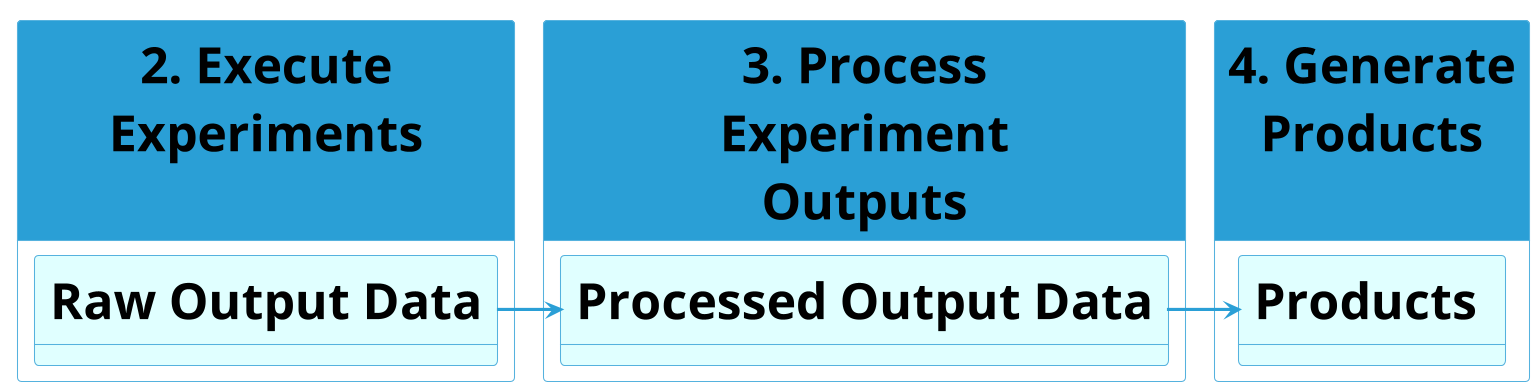
The Raw Output Data files from experimental runs is processed during stage 3 into Processed Output Data files. In stage 4 those processed files are turned into products of various sorts. All stage 4 products are sourced from a single data file, to encourage and enable reusability of code across projects. As such, it is the job of active stage 3 plugins to make sure all the data needed to generate a given product appear in the same file. The process of doing this is called Data Collation.
Important
Stage 3 operates at the level of Raw Output Data files and Experimental Runs, while stage 4 operates at the level of Collated Output Data files, Processed Output Data files and Experiments.
With that framing in mind, we can dive into the dataflow in detail.
Intra-Experiment Dataflow#
Within stage 3 the first type of data processing that occurs is intra-experiment data processing. If we look at the data from stage 2 for a single Experimental Run \(j\) from Experiment \(i\) in Batch Experiment which produces \(k\) raw output files, we could represent the output data abstractly as:
![skinparam defaultTextAlignment center
!theme cyborg
' Configuration
left to right direction
skinparam DefaultFontSize 24
skinparam DefaultFontColor #black
skinparam stateFontStyle bold
state "run j" as runj #skyblue {
state "file 0" as filej0 #darkturquoise
state "file 1" as filej1 #limegreen
state "..." as filejx #green
state "file k" as filejk #lightseagreen
filej0 -[hidden]r-> filej1
filej0 -[hidden]d-> filejx
filej1 -[hidden]d-> filejk
filejx -[hidden]r-> filejk
}](../../_images/plantuml-c67ae8de79ba5f1e270795443c1c77cd75fccc71.png)
For intra-experiment data processing, all of the per-run outputs are matched
across Experimental Runs within an
Experiment, and processed in some way (e.g., generating
statistical distributions). Crucially, the processing
is done at the level of entire files (i.e., it is a file-level reduce
operation). For example, if runs produce a foo.csv file, then every column
in foo.csv will be present in the corresponding Processed Output
Data files as well.
This can be visualized as follows:
![skinparam defaultTextAlignment center
!theme cyborg
' Configuration
skinparam DefaultFontSize 48
skinparam DefaultFontColor #black
skinparam stateBorderThickness 8
skinparam stateFontStyle bold
state "run 0" as run0 #skyblue {
state "file 0" as file00 #darkturquoise
state "file 1" as file01 #limegreen
state "..." as file0x #green
state "file k" as file0k #lightseagreen
file00 -[hidden]r-> file01
file00 -[hidden]d-> file0x
file01 -[hidden]d-> file0k
file0x -[hidden]r-> file0k
}
state "run 1" as run1 #skyblue {
state "file 0" as file10 #darkturquoise
state "file 1" as file11 #limegreen
state "..." as file1x #green
state "file k" as file1k #lightseagreen
file10 -[hidden]r-> file11
file10 -[hidden]d-> file1x
file11 -[hidden]d-> file1k
file1x -[hidden]r-> file1k
}
state "..." as runx #skyblue
state "run j" as runj #skyblue {
state "file 0" as filej0 #darkturquoise
state "file 1" as filej1 #limegreen
state "..." as filejx #green
state "file k" as filejk #lightseagreen
filej0 -[hidden]r-> filej1
filej0 -[hidden]d-> filejx
filej1 -[hidden]d-> filejk
filejx -[hidden]r-> filejk
}
state "Processed outputs" as intra #skyblue {
state "file 0" as filep0 #darkturquoise
state "file 1" as filep1 #limegreen
state "..." as filepx #green
state "file k" as filepk #lightseagreen
filep0 -[hidden]r-> filep1
filep1 -[hidden]r-> filepx
filepx -[hidden]r-> filepk
}
run0 -[hidden]r-> run1
run1 -[hidden]r-> runx
runx -[hidden]r-> runj
run1 -d-> intra
run0 -d-> intra
runx -d-> intra
runj -d-> intra](../../_images/plantuml-fb83b0684e9531bf01d87f3576c89e5518f58b0e.png)
Some examples of plugins performing this reduce operation:
Inter-Experiment Dataflow#
Within stage 3 the second type of data processing that occurs is inter-experiment data processing. If we look at the data from stage 2 for a single Experimental Run \(j\) from Experiment \(i\) in Batch Experiment which produces \(k\) raw output files, we could represent the output data abstractly as follows, using Experimental Run as SCOPE:
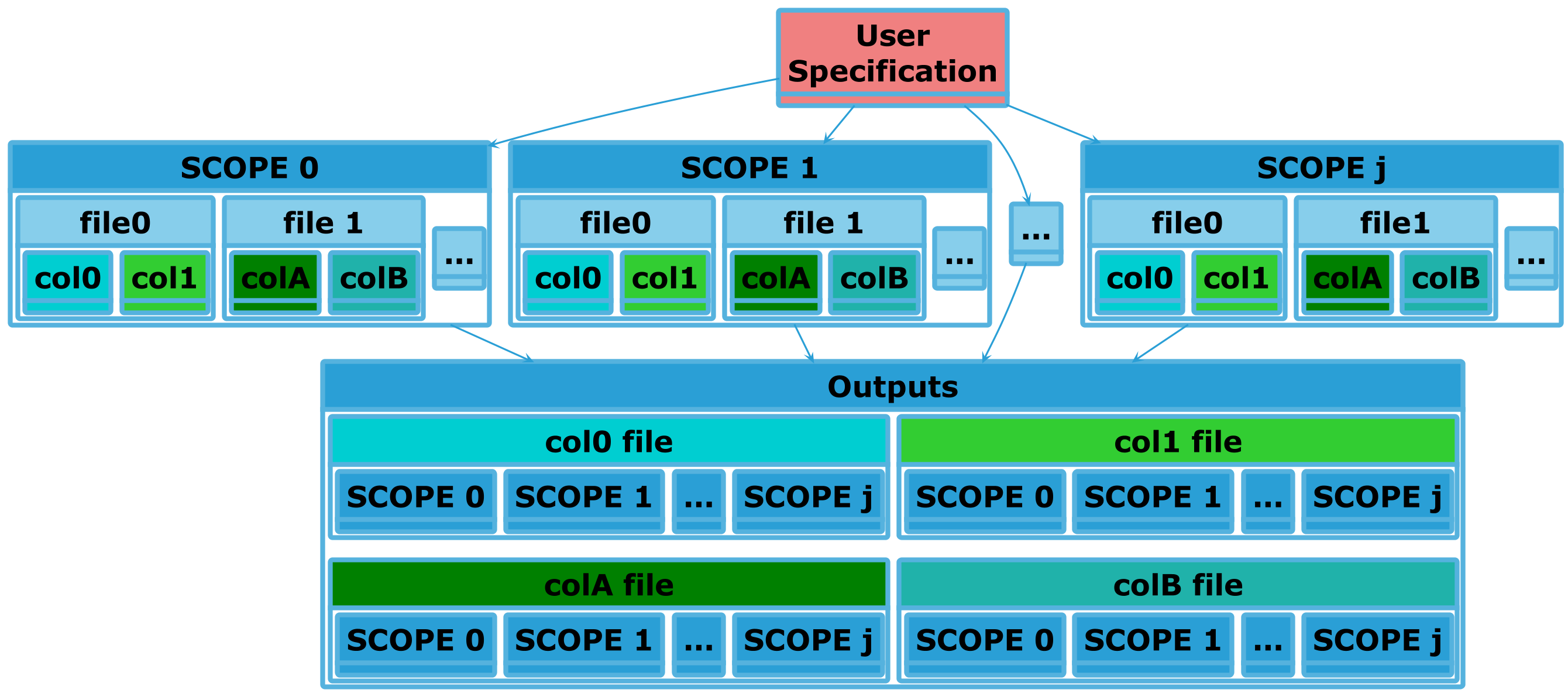
An important point here is that within the SIERRA builtin stage3 processing
plugins not all raw output files get processed in this manner, only those which
are going to be used during stage 4 to produce something via a
user-specification. Generally this means that there is a .yaml file in a
Project somewhere which has a list of Products which a
user wants to generate. This list is matched against the raw output files, and
only matching files are processed. Thus, SIERRA is very efficient in its data
processing.
Tip
Processed Output Data files can be thought of as time-series data at the level of Experimental Runs.
Some examples of plugins performing this reduce operation:
Stage 4 Dataflow#
At the highest level we have the following in the context of pipeline stages 3-5:
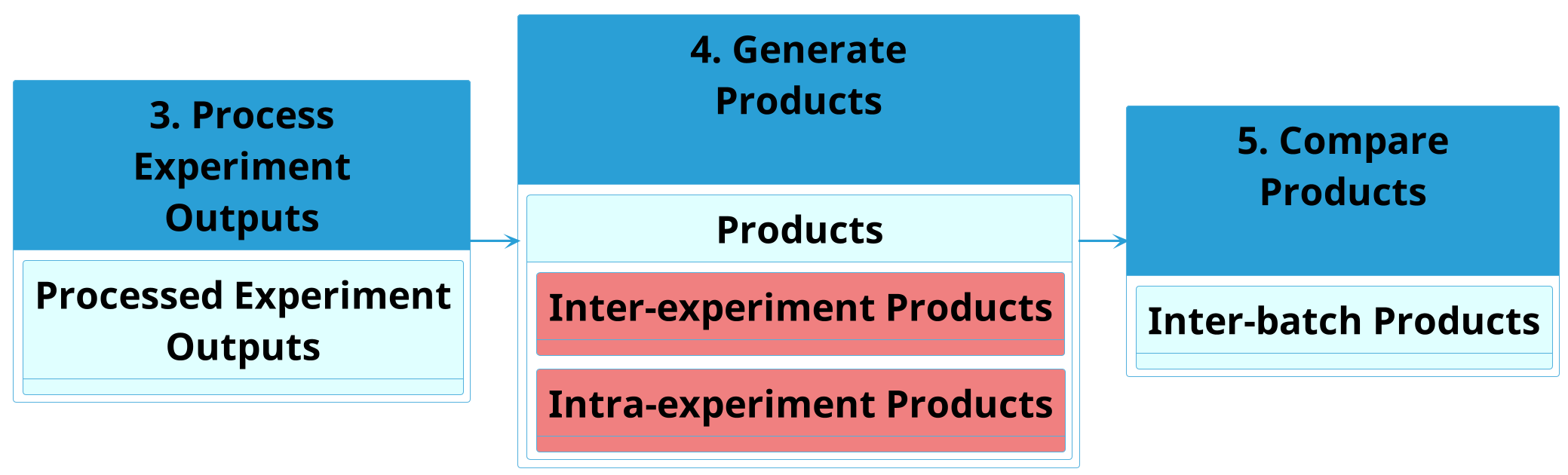
After Stage 3 Dataflow, data is in Processed Output Data files and/or Collated Output Data files. In stage 4, the Processed Output Data files can be taken and directly converted to products along one of two paths using appropriate plugins:
Intra-experiment products such as graphs and videos, which are built from a single processed output data file.
Inter-experiment products such as graphs, which are built by joining together identical sections/slices of the processed output data files for a single experiment.
Like the stage3 dataflow, generally in stage4 things are file-level.
Intra-Experiment Dataflow#
![skinparam defaultTextAlignment center
!theme cyborg
' Configuration
left to right direction
skinparam DefaultFontSize 48
skinparam DefaultFontColor #black
skinparam stateFontStyle bold
state "Processed Experiment\nOutputs" as proc #lightcyan {
state "file 0" as filep0 #darkturquoise
state "file 1" as filep1 #limegreen
state "..." as filepx #green
state "file k" as filepk #lightseagreen
filepx -[hidden]r-> filepk
filep1 -[hidden]r-> filepx
filep0 -[hidden]r-> filep1
}
state "Intra-Experiment\nProducts" as prod #lightcyan {
state "product 0" as productp0 #darkturquoise
state "product 1" as productp1 #limegreen
state "..." as productpx #green
state "product k" as productpk #lightseagreen
productpx -[hidden]r-> productpk
productp1 -[hidden]r-> productpx
productp0 -[hidden]r-> productp1
}
filep0 --> productp0
filep1 --> productp1
filepk --> productpk
filepx --> productpx](../../_images/plantuml-7ea601a70c327a1cab37a9698b67c673617777c8.png)
There isn't really any dataflow for intra-experiment products, because there is a 1:1 mapping between the Processed Output Data file and the Product: all the data needed to generate a given product is within a single file.
Inter-Experiment Dataflow#
Inter-experiment processing in stage4 is Data Collation, but this time at the level of Experiments rather the Experimental Runs:
This process in stage 3 can be visualized as follows for a single Batch Experiment, using Experiment as SCOPE. Input files in this case are Processed Output Data, and output files are Collated Output Data at the experiment level. Each output file is a summary of a batch experiment along some axis of interest.
Once processed, products can be generate directly from the inter-experiment files with a 1:1 mapping as above.
Stage 5 Inter-Batch Dataflow#
After Stage 4 Dataflow, data is in Processed Output Data files and/or Collated Output Data files. In stage 5, the Collated Output Data files can be taken and further collated to create Inter-Batch Data files. The dataflow for this can be visualized as follows, with Batch Experiment as SCOPE.
Each output file is a summary of a set of batch experiments along some axis of interest.#