

Pipeline#
This page provides a more detailed overview of its pipeline, expanding on the architectural diagram, as well as deep-dives for what happens in each stage. For reference, here is the high-level view of the pipeline:
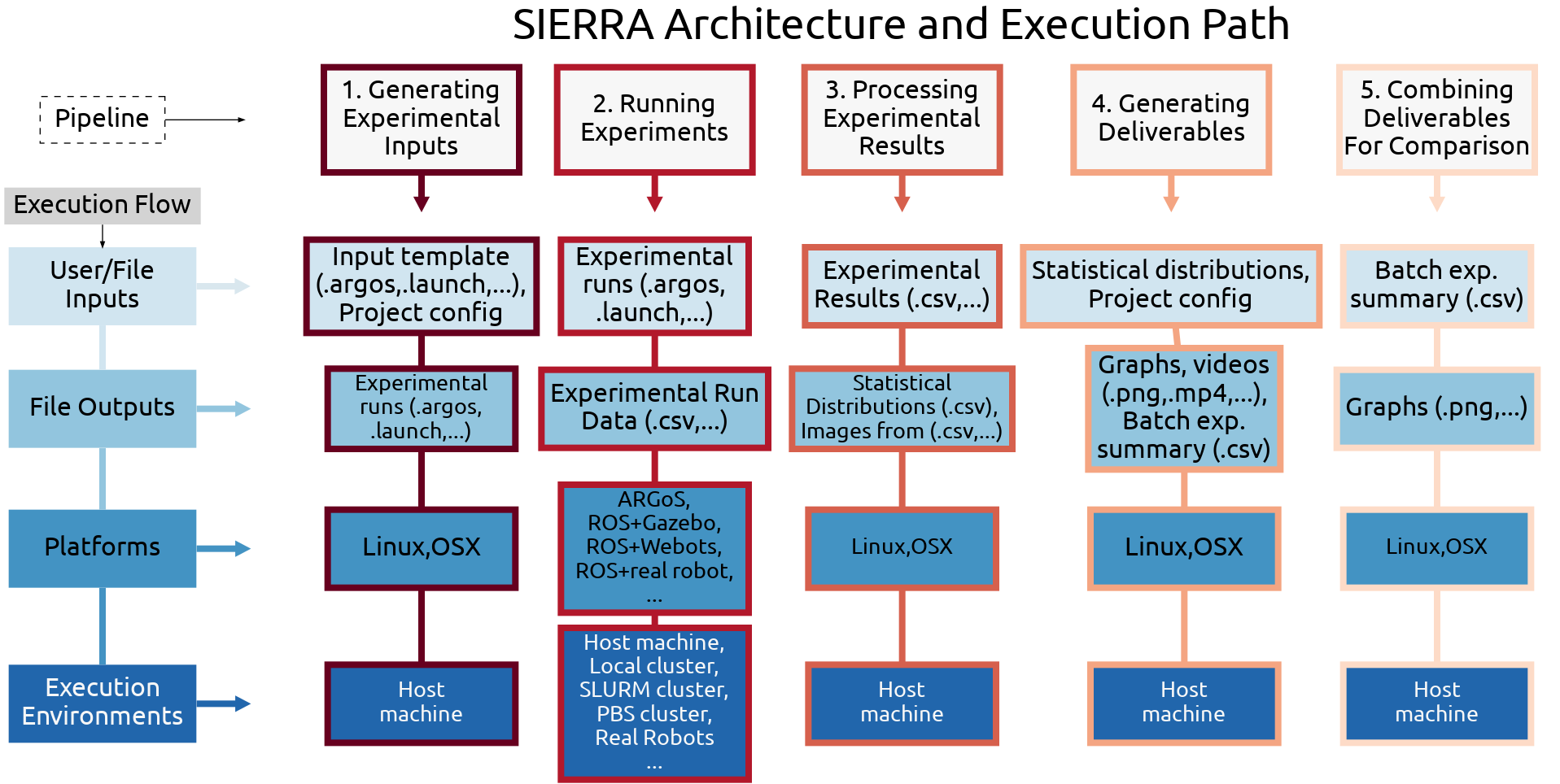
SIERRA architecture, organized by pipeline stage, left to right. High-level inputs/outputs and active plugins and shown for each stage. “...” indicates areas of further extensibility and customization via new plugins. “Host machine” indicates the machine SIERRA was invoked on.#
Stage 1: Experiment Generation#
Detailed Overview#
Experiments using the scientific method have an independent variable whose impact on results are measured through a series of trials. SIERRA allows you to express this as a research query on the command line, and then parses your query to make changes to a template input file to generate launch commands and experimental inputs to operationalize it. Switching from targeting engine A (e.g., ARGoS) to engine B (e.g., ROS1+Gazebo) is as easy as changing a single command line argument. SIERRA handles the "backend" aspects of defining experimental inputs allowing you to focus on their content, rather than the mechanics of how to turn the content into something that can be executed.
The following plugins are active in this stage:
Plugin |
Used for |
|---|---|
Handling cmdline arguments needed by the selected engine, assisting with experimental input generation. |
|
Generating inputs for the selected Engine which can be executed in stage 2 from the --expdef-template experiment template file. |
|
Assisting with experimental input generation so experiments can be executed during stage 2. |
See also:
Part of default pipeline. For a deep dive into design and functionality, see the deep dive.
Stage 2: Experiment Execution#
SIERRA runs a previously generated Batch Experiment. Exactly which batch experiment SIERRA runs is determined by:
--controller--scenario
Thus, these arguments must be the same between stage{1,2} if you want to execute the experiments you generated.
SIERRA currently supports two types of execution environments: simulators and real robots, which are handled seamlessly. For simulators, SIERRA will run multiple experimental runs from each experiment in parallel if possible. Similar to stage 1, switching between execution environments is as easy as changing a single command line argument.
The following plugins are active in this stage:
Plugin |
Used for |
|---|---|
Performing validation of execution environment before running experiments in stage 2. |
|
Executing shell commands to run the experiments generated during stage 2. |
Part of default pipeline.
Stage 3: Experiment Post-Processing#
SIERRA supports a number of data formats which simulations/real robot experiments can output their data. SIERRA post-processes experimental results after running the Batch Experiment according to the set of active processing plugins.
The following plugins are active in this stage:
Plugin |
Used for |
|---|---|
Extracting any information needed from the engine in order to assist with processing experimental outputs. |
|
Reading/writing raw experimental outputs to/from the filesystem during processing. |
|
Processing raw experimental outputs into a form suitable for generating products in stage 4. |
Some parts of this stage are done in parallel by default. Part of default pipeline.
Stage 4: Product Generation#
SIERRA can generate many products from the processed experimental results automatically (independent of the engine/execution environment!), thus greatly simplifying reproduction of previous results if you need to tweak a given graph (for example).
The following plugins are active in this stage:
Plugin |
Used for |
|---|---|
Extracting any information needed from the engine in order to assist with generating products, such as the # agents for a given Experimental Run. |
|
|
For some examples, see the "Generating Products" section of 2022 AAMAS Demo. See Rendering for details about rendering capabilities.
Part of default pipeline.
Stage 5: Product Comparison#
SIERRA can perform additional product generation AFTER graph generation for batch experiments has been run. This is extremely useful for generating things which can be dropped immediately into academic papers/customer reports without modification.
The following plugins are active in this stage:
Plugin |
Used for |
|---|---|
Extracting any information needed from the engine in order to assist with generating comparative products, such as the # agents for a given Experimental Run. |
|
|
Not part of default pipeline.