

Creating a New SIERRA Project#
Important
There are several sample projects available for all of SIERRA's built-in engines and execution environments which can be used in tandem with this guide to build your own project.
Preliminaries#
Before beginning, determine the following:
Do you need to create a new Engine for your Project? Unless the simulator/hardware engine you want to use already has a SIERRA plugin, you will have to do this. If so, following New Engine Plugin (--engine).
Note
Currently there is no way to share projects across engines; any common code will have to be put into common python files and imported as needed.
Do you need to create a new execution environment for your Project? If you are targeting a simulator of some sort, you probably don't have to, at least initially, as SIERRA supports running simulators locally out of the box. If you want/need to run on e.g., some sort of exotic cluster-based environment, see New Execution Environment Plugin (--execenv).
If you want to use SIERRA with some sort of real hardware (e.g., a specific robot), you probably will have to create a new execution environment plugin. See New Execution Environment Plugin (--execenv) for details.
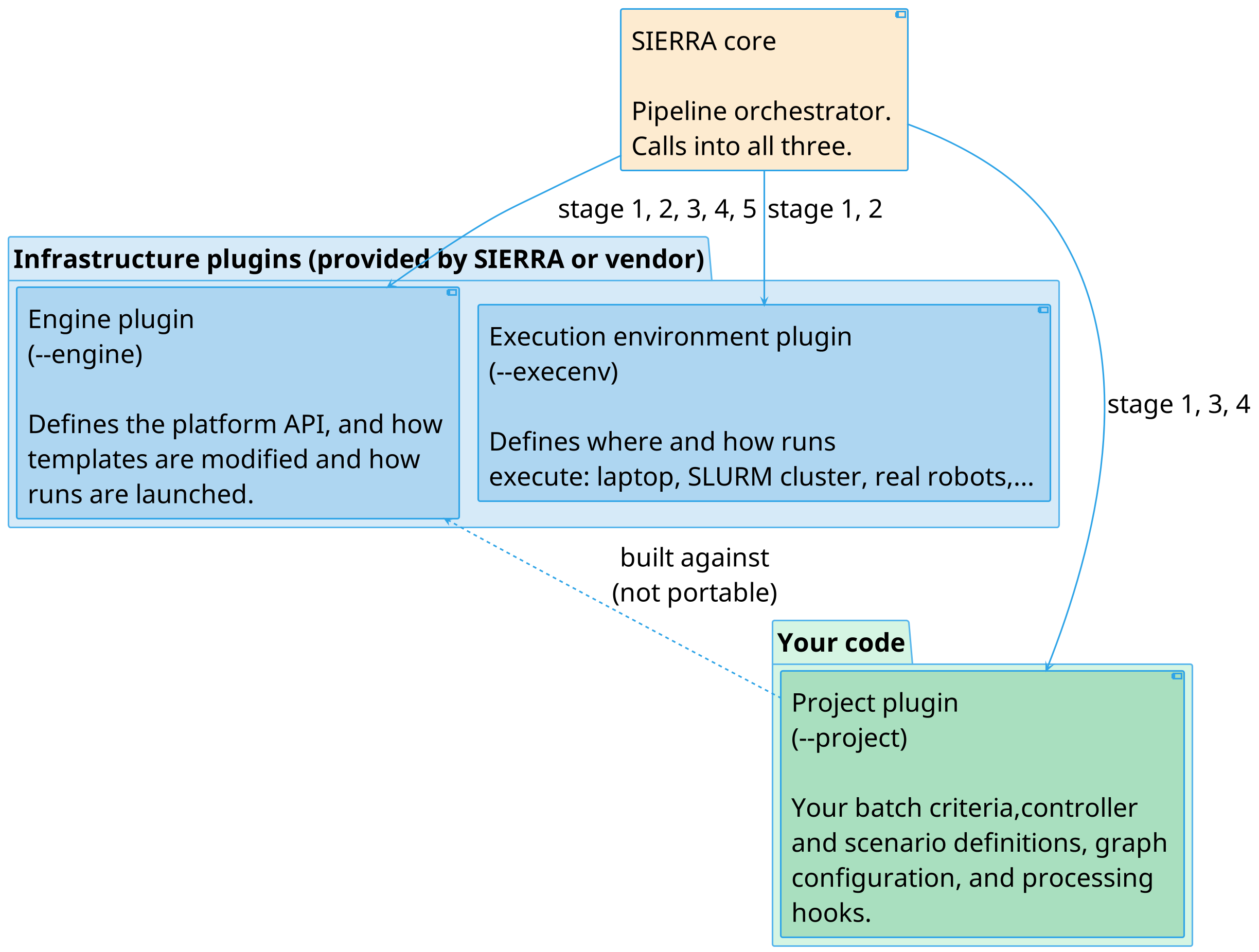
The distinction between execution environments and engines is important, and gets to one of the core ways in which SIERRA was designed, so it is worth taking a moment to understand:
Engines are the thing you are building your software against (sort of like building against an API), while execution environments are the thing you want your software to run on.
In pictures:
Steps#
Create the directory which will hold your Project. The directory containing your project (i.e., it's parent directoly) must be on
SIERRA_PLUGIN_PATHor SIERRA won't be able to find your project. For example, if your project isfizzbuzz.awesome, and that directory is inprojectsas/path/to/projects/fizzbuzz.awesome, then some subpath of/path/to/projectsneeds to be onSIERRA_PLUGIN_PATH.Create the following directory structure within your project directory (or copy and modify the one from an existing project, such as the SIERRA sample projects).
config/- Plugin YAML configuration root. This directory is required for all projects. Within this directory, the following files are used (not all files are required when running a stage that utilizes them):Main SIERRA configuration file. This file is required for all pipeline stages. See Project YAML Configuration for documentation.
Configuration for controllers (input file/graph generation). This file is required for all pipeline stages. See Project YAML Configuration for documentation.
Configuration for graph generation. This file is optional. Used by multiple plugins. An incomplete list:
Configuration for intra- and inter-experiment models. This file is optional. If it is present, models defined in it will be run in stage 3. See Model Runner for documentation.
generators/- Classes to enable SIERRA to generate changes to template expdef files needed by your project. This directory is required for all SIERRA projects.Specifies classes and functions to enable SIERRA to generate expdef file modifications to the --expdef-template based on what is passed pas
--scenarioon the cmdline. Contains the parser for parsing the contents of--scenariointo a dictionary which can be used to configure experiments. This file is required. See Telling SIERRA About Scenario Details for documentation.Contains extensions to the per-Experiment and per-Experimental Run configuration that SIERRA performs. See Generating Experiments for documentation. This file is optional.
variables/- Additional variables (including batch criteria) defined by the plugin/project that can be directly or indirectly used by the --batch-criteria and--scenariocmdline arguments. This directory is optional.cmdline.py- Specifies cmdline extensions specific to the plugin/project. This file is required, because all projects have to define the--controllerand--scenarioarguments used by SIERRA. See Extending the SIERRA Cmdline For Your Plugin for steps.project.py- Magic cookie python file that tells SIERRA that the enclosing directory is a project plugin.
Configure your project so SIERRA understands how to generate Experimental Run inputs and process outputs correctly by following Project YAML Configuration.
Define graphs to be generated from Experiment outputs by following Graph Generation. Strictly speaking this is optional, but automated graph generation during stage 4 is one of the most useful parts of SIERRA, so its kind of silly if you don't do this.
Setup your --expdef-template appropriately by following Experiment Templates.
Optional Steps#
Define additional batch criteria to investigate variables of interest specific to your project by following Create A New Batch Criteria.
Define one or more Models to run to compare with empirical data.