

Intra-Experiment Data Collation#
When generating products, it is often necessary to perform some sort of non-statistical mathematical analysis on the results. These calculations cannot be done on the intra-experiment Processed Output Data files, because any calculated statistical distributions from them will be invalid; this can be thought of as an average of sums is not the same as a sum of averages. To support such use cases, SIERRA can make the necessary parts of the per-run Raw Output Data files available in stage 3 for doing such calculations via Data Collation. Of course, like all things in SIERRA, if you don't need this functionality, you can turn it off by deselecting the plugin.
This process in stage 3 can be visualized as follows for a single Experiment, using Experimental Run as SCOPE:
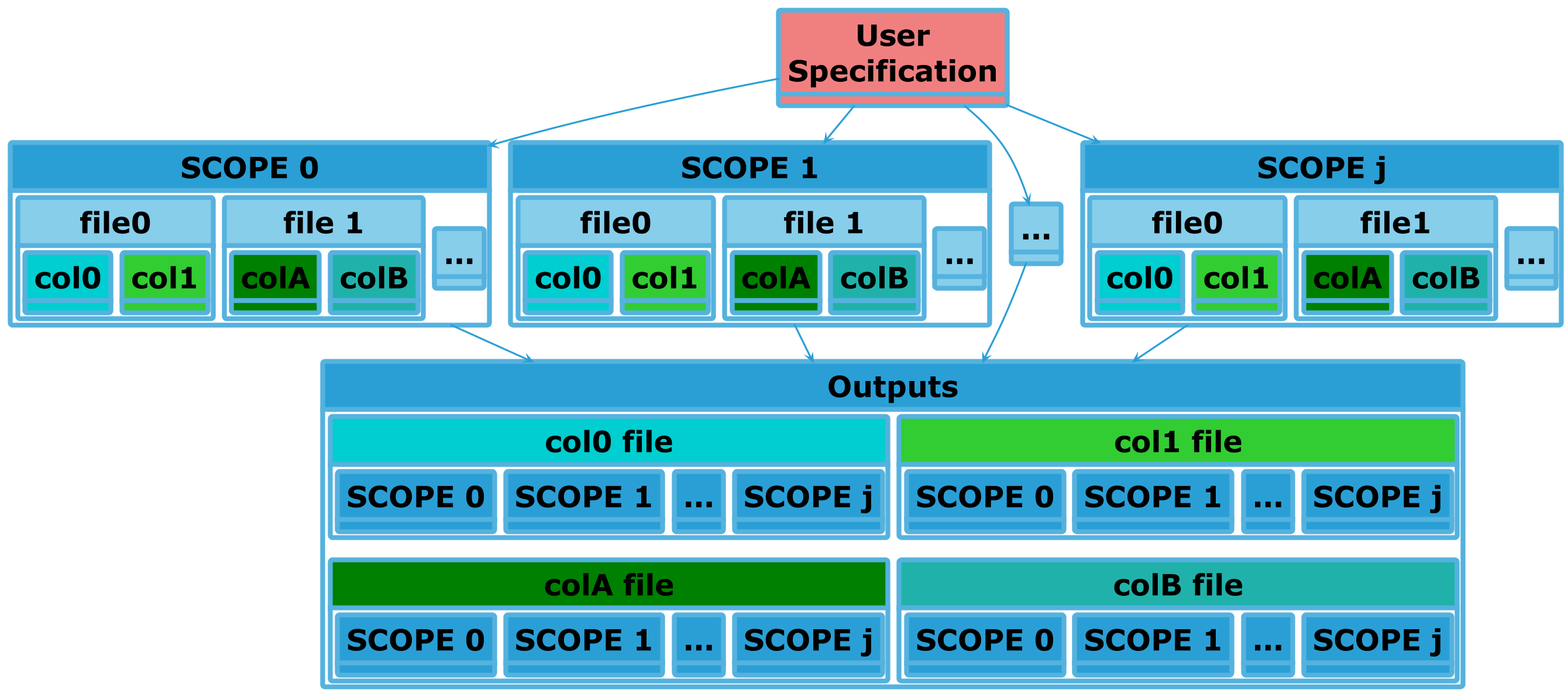
Here, the user has specified that the col{0,1} in file0 produced by all
experimental runs should be combined into a single file. Thus the
Collated Output Data file generated from that specification will have
\(j\) columns, one per run. Similarly for col{A,B} in file1. Each
collated output above draws its columns from a single source file; a collated
output can also draw columns from several source files, joined together per
run -- see Multi-source targets below.
This is collation within an experiment (intra-experiment). Collation across experiments (if enabled/configured) is done during stage 4, and is handled by a different plugin. That stage-4 collation consumes the single, already-joined files produced here, so it deliberately has no multi-source spelling of its own: joining data from multiple files belongs upstream, in this plugin.
This plugin requires that the selected storage plugin
supports pl.DataFrame objects.
Ordering Considerations#
Should come after proc.statistics to generate statistics around collated
data.
Usage#
This plugin can be selected by adding proc.collate to the list passed to
--proc. Configuration for this plugin consists of what data to collate,
and some tweaks for how that data should be collated. When active, it will
create <batchroot>/statistics and the following directory structure:
|-- <batchroot>
    |-- statistics
        |-- inter-exp
inter-exp/ contains Collated Output Data files, drawn from specific
columns in Raw Output Data files. This plugin outputs its data as
described above is so it can be used with Graph Generation, which
expects its outputs to be under statistics/.
This plugin does not require additional plugins to be active when it is run.
Cmdline Interface#
sierra - CLI interface#
sierra [--skip-collate]
sierra Multi-stage options#
Options which are used in multiple pipeline stages
Specify that no collation of data across experiments within a batch (stage 4) or across runs within an experiment (stage 3) should be performed. Useful if collation takes a long time and multiple types of stage 4 outputs are desired. Collation is generally idempotent unless you change the stage3 options (YMMV).
Configuration#
Controls what to collate. Collated data is usually "interesting" in some way;
e.g., related to system performance. Configuration lives in a collate.yaml
file, which is a flat list of collation targets. There is no top-level
section key; collation is intra-experiment only, so the list stands on its own.
The whole file is validated up front, before any collation runs. If there are problems, all of them are reported together (rather than failing on the first), and unknown keys are rejected. Each target is one of two spellings: single-source (the common case) or multi-source.
Single-source targets#
A single-source target names one file and the cols to lift from it:
# A flat list of targets -- no 'intra-exp:' wrapper.
- file: output1D.csv
  cols:
    - col1
    - col2
The generated Collated Output Data file is named after the source file's
stem (output1D above), yielding output1D-col1 and output1D-col2, each
with one column per run. To name the output explicitly instead, add an optional
name key.
Key |
Required? |
Meaning |
|---|---|---|
|
Yes |
The source file to collate from each run. See How file is matched for how this value is matched. |
|
Yes |
The columns to lift from |
|
No |
The output stem for this target. Defaults to the stem of |
How file is matched#
file is matched exactly against each candidate output's path relative to
the run output root -- it is not a substring match. In practice:
A bare name (
output1D) resolves at the run output root only. It does not match a same-named file nested in a subdirectory.A file in a subdirectory is named by path-qualifying the value (
subdir1/subdir2/output1D).The value may be written with or without the storage extension: both
output1Dandoutput1D.csvmatchoutput1D.csv.A value that matches more than one output file is an ambiguous specification and is a hard error (SIERRA will not silently pick one or fan the target out over all of them). Path-qualify the value to disambiguate.
A value that matches no file means that run simply did not produce it, and the run contributes nothing to that target -- not an error.
Multi-source targets#
Sometimes the columns for one collated output live in different source files.
A multi-source target names an explicit name and a list of sources,
whose columns are joined together per run before collation:
- name: combined
  sources:
    - file: output1D.csv
      cols:
        - col1
    - file: energy.csv
      cols:
        - name: col1
          as: col1_energy
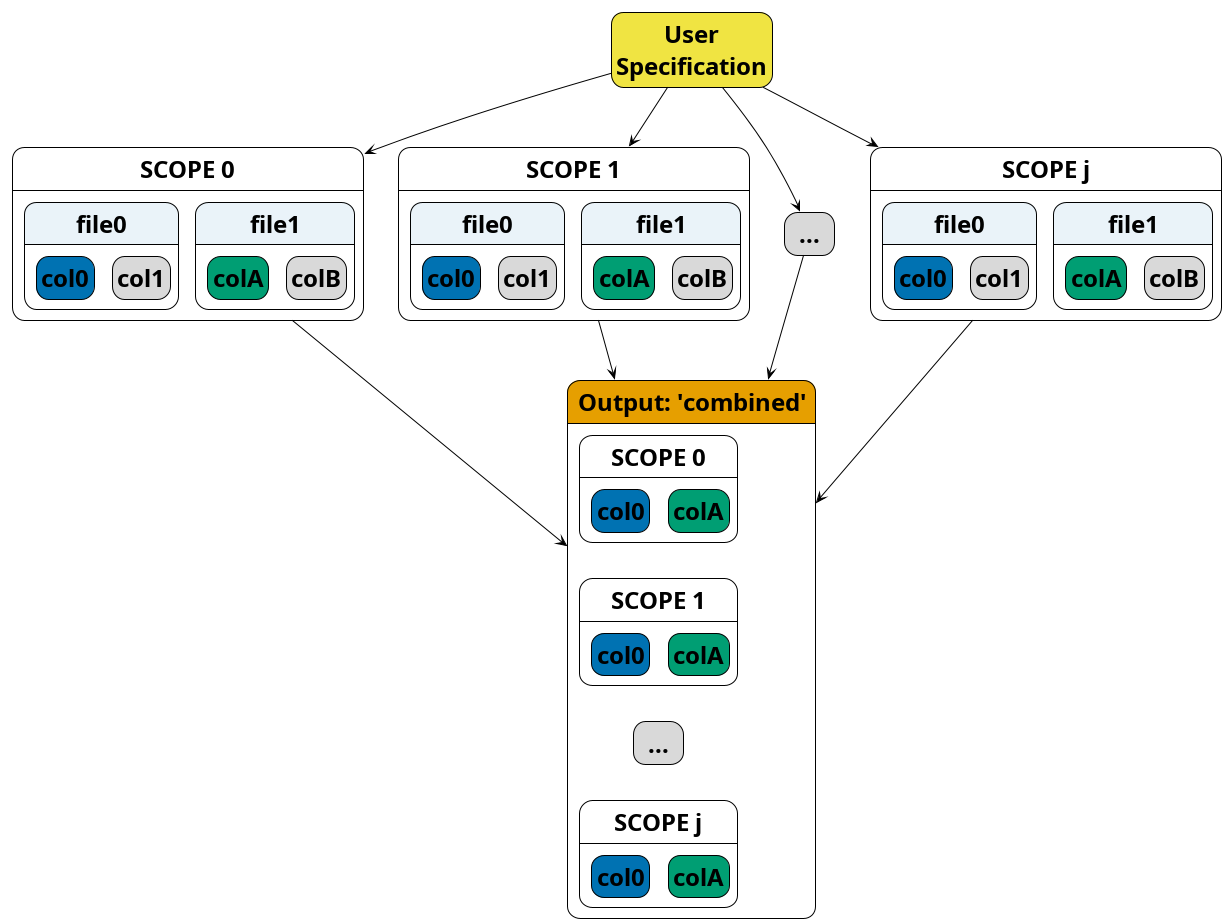
This can be visualized as follows, using Experimental Run as SCOPE. Here
the combined target draws col0 from file0 and colA from file1
in every run; the two are joined so that each run contributes a
(col0, colA) pair to the single collated output (unused columns greyed):
Each source has the same file and cols fields as a single-source target
(file is matched by the same rules above). The sources are combined per
run on a shared row axis: they must have the same number of rows, and row
\(i\) must mean the same run-relative position in each. The per-column output
names (after any as renaming) become the collated outputs, exactly as in the
single-source case -- so the example above produces combined-col1 and
combined-col1_energy.
Key |
Required? |
Meaning |
|---|---|---|
|
Yes |
The output stem shared by this target's collated outputs. Required here
(unlike single-source, there is no single |
|
Yes |
A list of |
The {name, as} column form exists mainly to resolve collisions: if two
sources both contribute a column called col1, the joined frame cannot hold
two columns of the same name. Rename at least one with as (e.g.
col1_energy above). An unresolved collision -- two sources exposing the same
output column name -- is a config error, reported up front like all other
problems.